> ## Documentation Index
> Fetch the complete documentation index at: https://docs.alvys.com/llms.txt
> Use this file to discover all available pages before exploring further.
# Monarch Tracking Integration
> Connect Monarch GPS Insight ELD to Alvys to stream live truck locations to the Asset Map and populate IFTA miles automatically for compliance reporting.
The Monarch GPS Insight integration (also called Monarch Tracking or Monarch ELD) pulls real-time truck location data and IFTA miles from Monarch into Alvys, enabling visibility on the Asset Map and simplified IFTA compliance reporting.
## What This Integration Does
Monarch GPS Insight is an Electronic Logging Device (ELD) solution popular among logistics companies operating near the border. Once configured, Alvys pulls real-time truck location data and IFTA miles from Monarch automatically. This gives dispatchers and operations teams live visibility into truck locations on the Load Details page and Asset Map, and populates the IFTA Report with accurate mileage for simplified compliance reporting.
## Prerequisites
Before setting up this integration, obtain your Monarch **Username**, **Password**, and the **Asset ID** for each truck you want to track from Monarch. Asset IDs are available in your Monarch portal. Allow approximately 15 minutes for setup.
## Connect / Authenticate
1. Open your Company Profile. Click your user profile icon in the lower left corner of Alvys. Select the subsidiary you want to configure, then click the **Integrations** tab.
2. Expand the **ELD** section and click the pencil icon on the **Monarch** card.
3. Enter your Monarch **Username** and **Password**. Select the subsidiaries that should use this integration, then click **Save**.
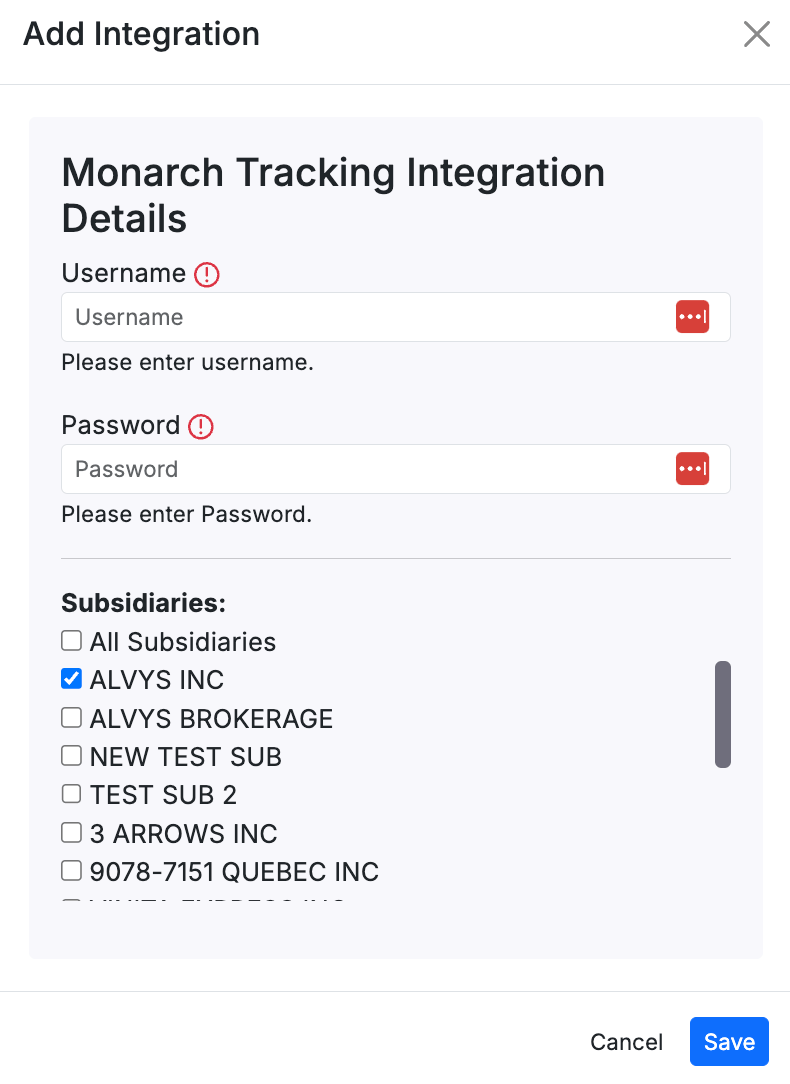 *Monarch card in the ELD section of the Company Profile Integrations tab, showing the credential entry form with Username and Password fields*
Alvys validates your credentials. If everything is correct, the integration becomes active.
## Field & Data Mapping
After the integration is active, link each truck in Alvys to its corresponding Monarch Asset ID to tell Alvys which truck to track.
1. Go to **Assets** in the left navigation menu and select **Trucks**.
2. Double-click the truck you want to configure.
3. Scroll to the **ELD Integrations** section and click **Add Integration**.
4. Select **Monarch** from the dropdown, enter the **Asset ID** provided by Monarch in the Integration ID field, and click **Save**.
5. Repeat this process for each truck you want to track with Monarch.
*Monarch card in the ELD section of the Company Profile Integrations tab, showing the credential entry form with Username and Password fields*
Alvys validates your credentials. If everything is correct, the integration becomes active.
## Field & Data Mapping
After the integration is active, link each truck in Alvys to its corresponding Monarch Asset ID to tell Alvys which truck to track.
1. Go to **Assets** in the left navigation menu and select **Trucks**.
2. Double-click the truck you want to configure.
3. Scroll to the **ELD Integrations** section and click **Add Integration**.
4. Select **Monarch** from the dropdown, enter the **Asset ID** provided by Monarch in the Integration ID field, and click **Save**.
5. Repeat this process for each truck you want to track with Monarch.
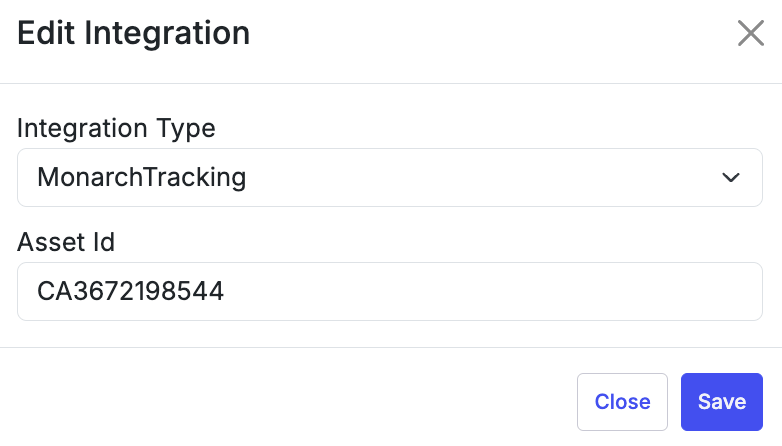 *ELD Integrations section on a truck record showing the Add Integration button and the Monarch Asset ID entry field*
## Sync Behavior
Monarch sends location data and IFTA mileage to Alvys automatically at regular intervals once a truck is mapped and the integration is active. No manual sync is required.
## Verify It's Working
### View truck location on a load
Open a load's details page for a load with an assigned truck that has been mapped to Monarch. Real-time truck location data from Monarch appears directly on the Load Details page.
*ELD Integrations section on a truck record showing the Add Integration button and the Monarch Asset ID entry field*
## Sync Behavior
Monarch sends location data and IFTA mileage to Alvys automatically at regular intervals once a truck is mapped and the integration is active. No manual sync is required.
## Verify It's Working
### View truck location on a load
Open a load's details page for a load with an assigned truck that has been mapped to Monarch. Real-time truck location data from Monarch appears directly on the Load Details page.
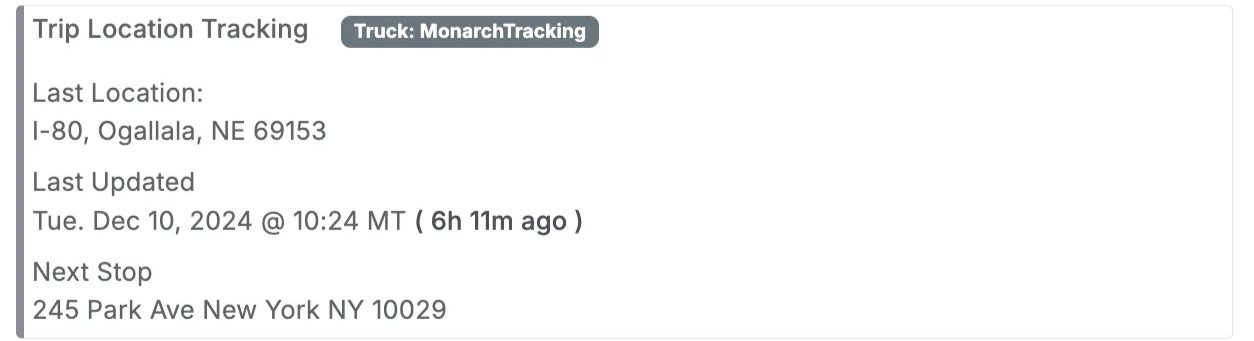 *Load Details page showing real-time truck location pulled from Monarch for a load with an assigned truck*
### View all truck locations on the Asset Map
All truck locations from Monarch appear in a consolidated view on the **Asset Map**, accessible from the left navigation menu.
*Load Details page showing real-time truck location pulled from Monarch for a load with an assigned truck*
### View all truck locations on the Asset Map
All truck locations from Monarch appear in a consolidated view on the **Asset Map**, accessible from the left navigation menu.
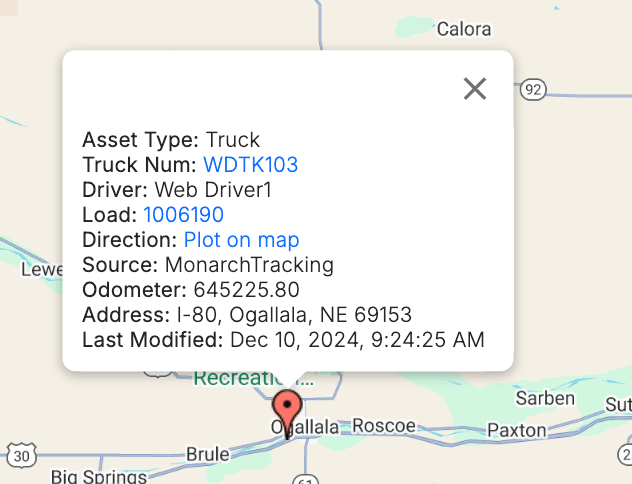 *Asset Map showing all Monarch-tracked truck locations in a consolidated view*
### Generate IFTA reports
Alvys includes IFTA mileage from Monarch automatically in the **IFTA Report**. Access the IFTA Report to view accurate, up-to-date compliance records.
*Asset Map showing all Monarch-tracked truck locations in a consolidated view*
### Generate IFTA reports
Alvys includes IFTA mileage from Monarch automatically in the **IFTA Report**. Access the IFTA Report to view accurate, up-to-date compliance records.
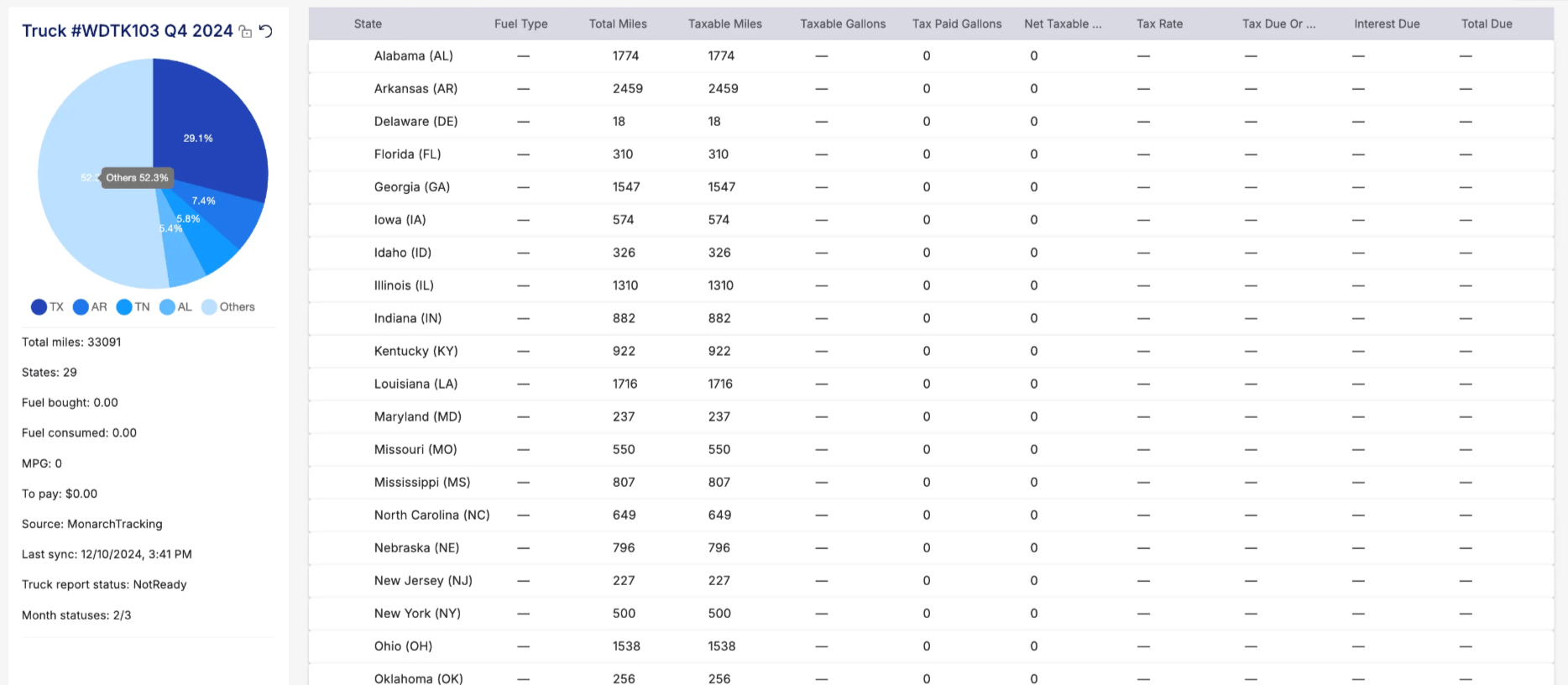 *IFTA Report showing mileage data populated from Monarch for compliance reporting*
## FAQs
**Q: Why is Monarch particularly popular near the border?**
**A:** Monarch ELDs are particularly popular among logistics companies operating near the border, making this integration essential for streamlined operations and compliance in these regions.
**Q: What features does Monarch provide?**
**A:** Monarch provides real-time truck location tracking and automated IFTA mile tracking for simplified compliance reporting.
**Q: Where do I find my Monarch Asset IDs?**
**A:** Your Monarch Asset IDs should be provided by Monarch or are available in your Monarch portal.
*IFTA Report showing mileage data populated from Monarch for compliance reporting*
## FAQs
**Q: Why is Monarch particularly popular near the border?**
**A:** Monarch ELDs are particularly popular among logistics companies operating near the border, making this integration essential for streamlined operations and compliance in these regions.
**Q: What features does Monarch provide?**
**A:** Monarch provides real-time truck location tracking and automated IFTA mile tracking for simplified compliance reporting.
**Q: Where do I find my Monarch Asset IDs?**
**A:** Your Monarch Asset IDs should be provided by Monarch or are available in your Monarch portal.