> ## Documentation Index
> Fetch the complete documentation index at: https://docs.alvys.com/llms.txt
> Use this file to discover all available pages before exploring further.
# Tender Documents - Customer Rate Confirmation V1
> Generate Customer Rate Confirmations from the redesigned Tender modal so brokers and carriers can capture signed load details and reduce disputes.
## Overview
To reduce the risks associated with informal exchange of critical load details, brokers and carriers can now generate Customer Rate Confirmations, which include all necessary load information to be signed by the customer.
This new feature replaces informal documentation methods, enhancing security and reducing potential disputes. Additionally, we've redesigned the Documents and Tender modals for improved usability.
## Generating Tender Documents - Tender Modal
The Tender modal now consists of two tabs: **Customer** and **Carrier** (or **Driver/Owner Operator**).
ℹ️ **Dynamic Tab Headings:**
* If the **Tender As** subsidiary is a **Broker**, the tab headings will be **Customer and Carrier**.
* If the **Tender As** subsidiary is a **Carrier**, the tab headings will be **Customer and Driver/Owner Operator**.
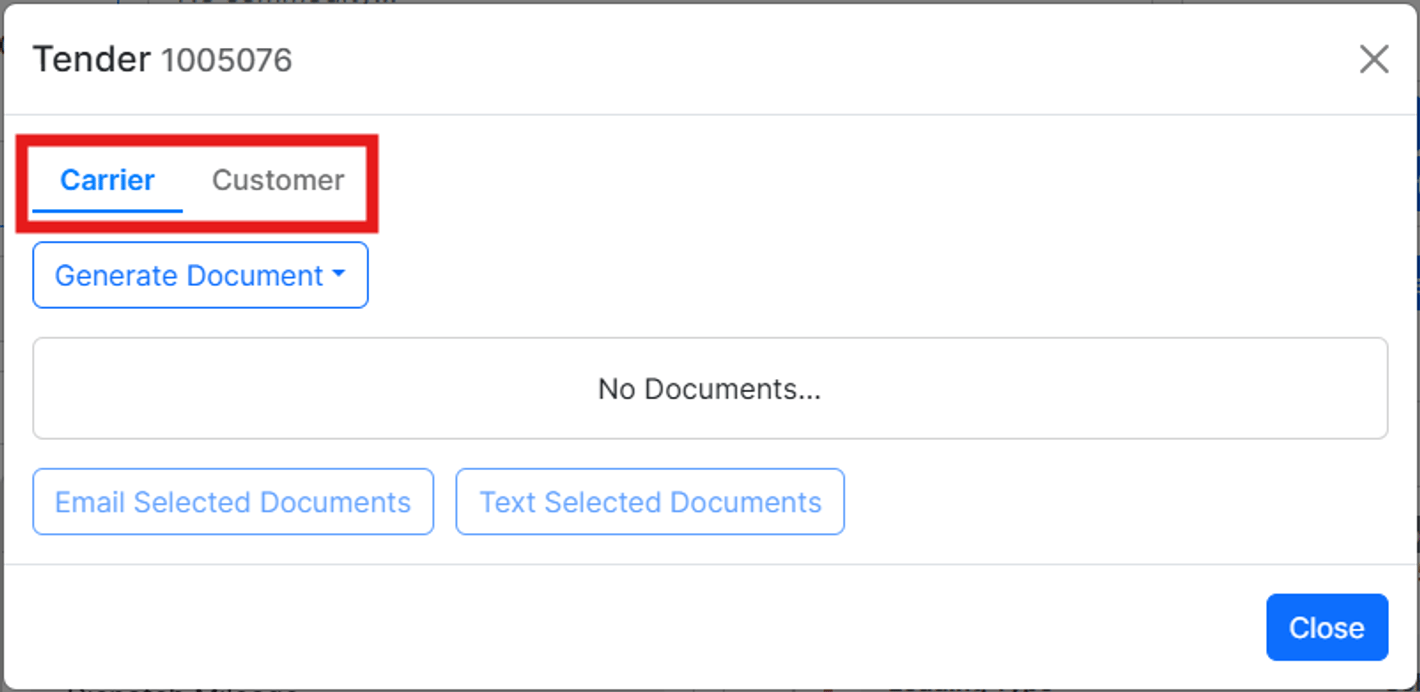
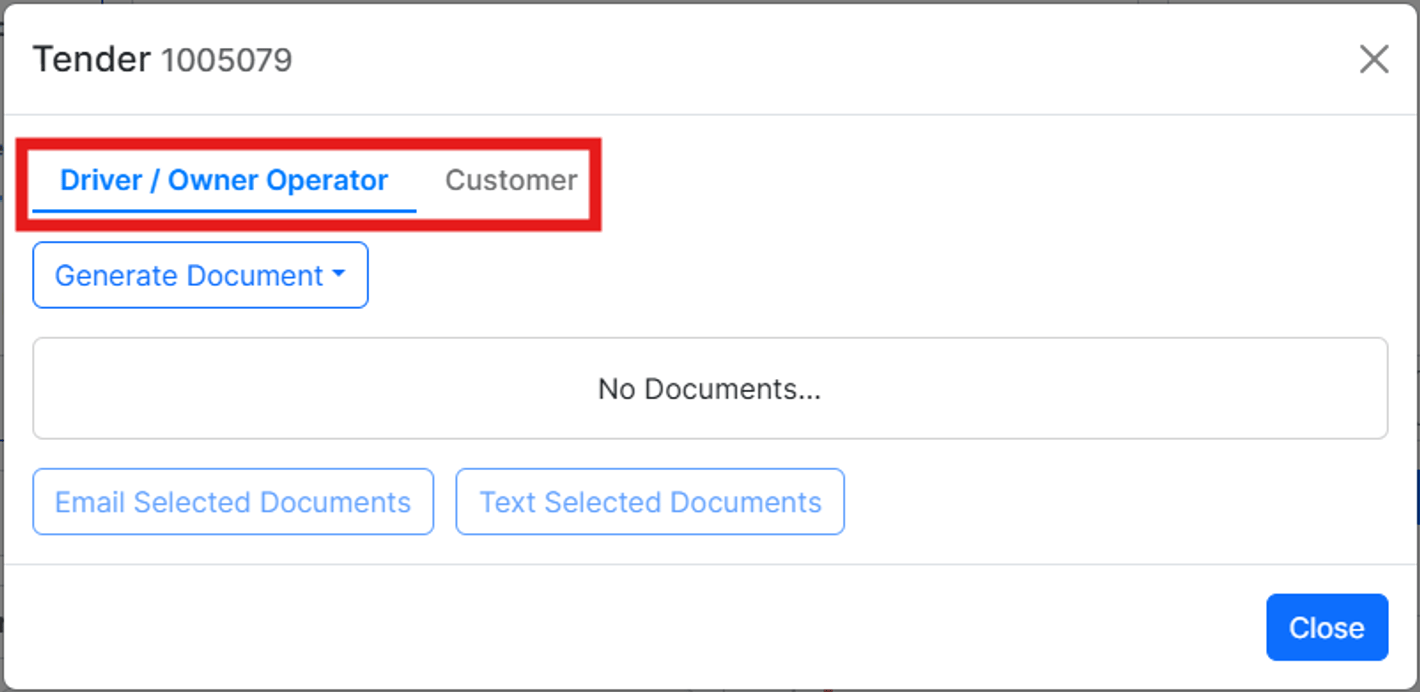 Each tab includes documents based on the intended audience:
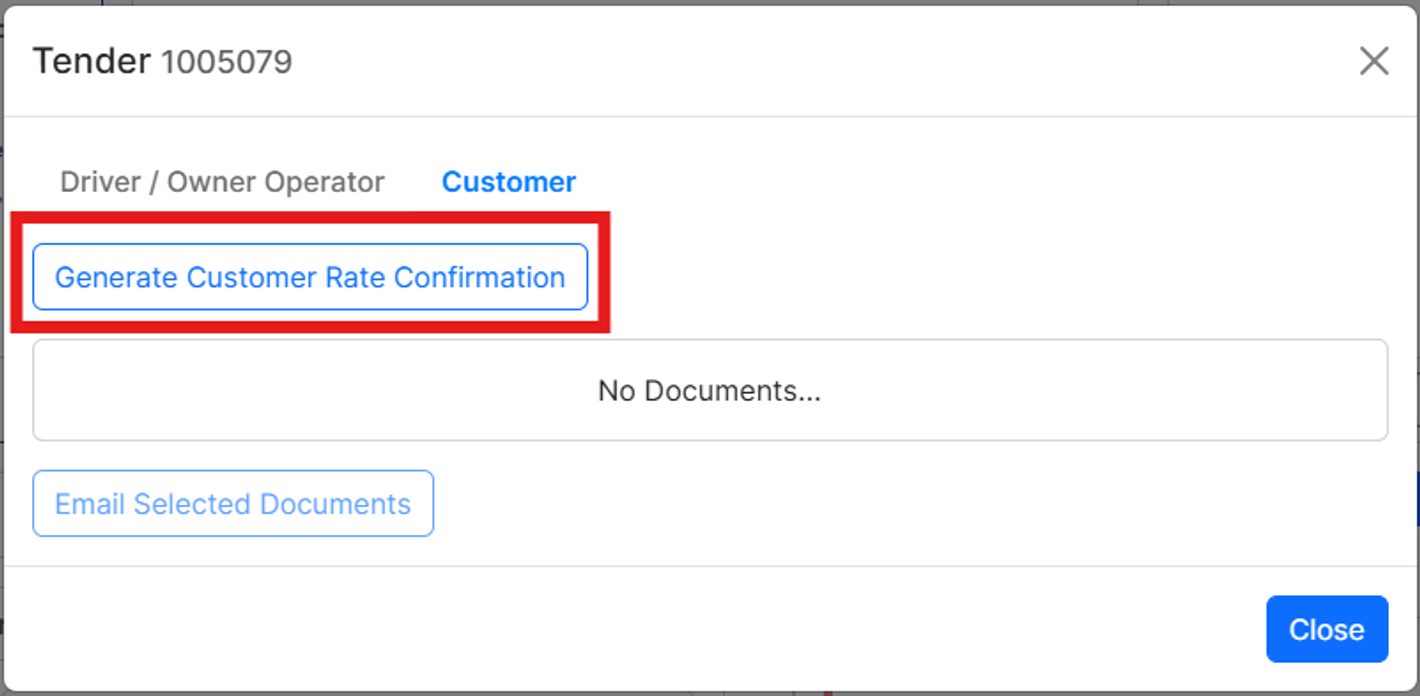
1. **Customer:** Customer Rate Confirmation
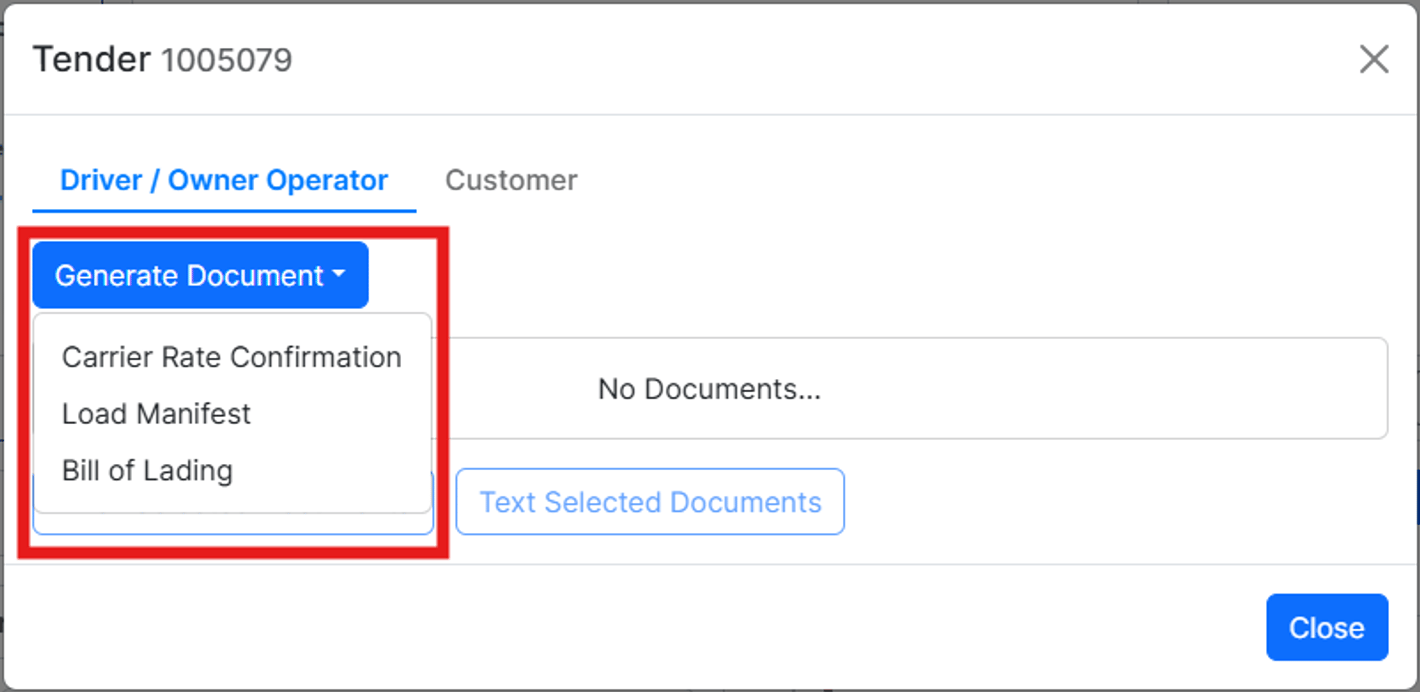
2. **Carrier or Driver/Owner Operator:** Carrier Rate Confirmation, Bill of Lading, Load Manifest
**💡 Note:** The existing Rate Confirmation has been renamed to Carrier Rate Confirmation
Each tab includes documents based on the intended audience:
1. **Customer:** Customer Rate Confirmation
2. **Carrier or Driver/Owner Operator:** Carrier Rate Confirmation, Bill of Lading, Load Manifest
**💡 Note:** The existing Rate Confirmation has been renamed to Carrier Rate Confirmation
 ## Generating the Customer Rate Confirmation
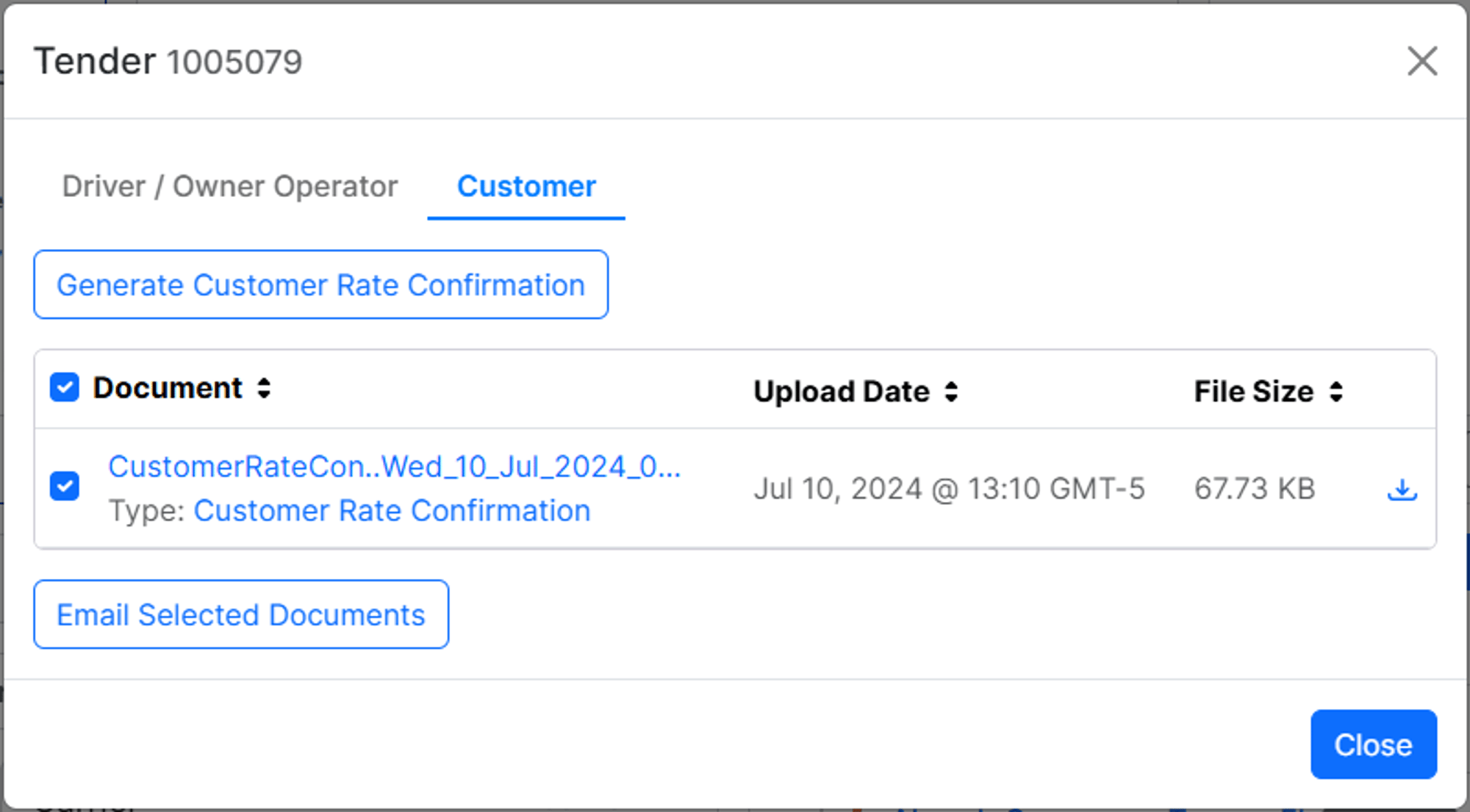
Users can generate the Customer Rate Confirmation from the Tender modal on the Load Details page. Follow these steps to generate the document:
1. Navigate to the Tender modal on the Load Details page.
2. Click the **Generate Customer Rate Confirmation** button.
## Generating the Customer Rate Confirmation
Users can generate the Customer Rate Confirmation from the Tender modal on the Load Details page. Follow these steps to generate the document:
1. Navigate to the Tender modal on the Load Details page.
2. Click the **Generate Customer Rate Confirmation** button.
 ## Emailing the Customer Rate Confirmation
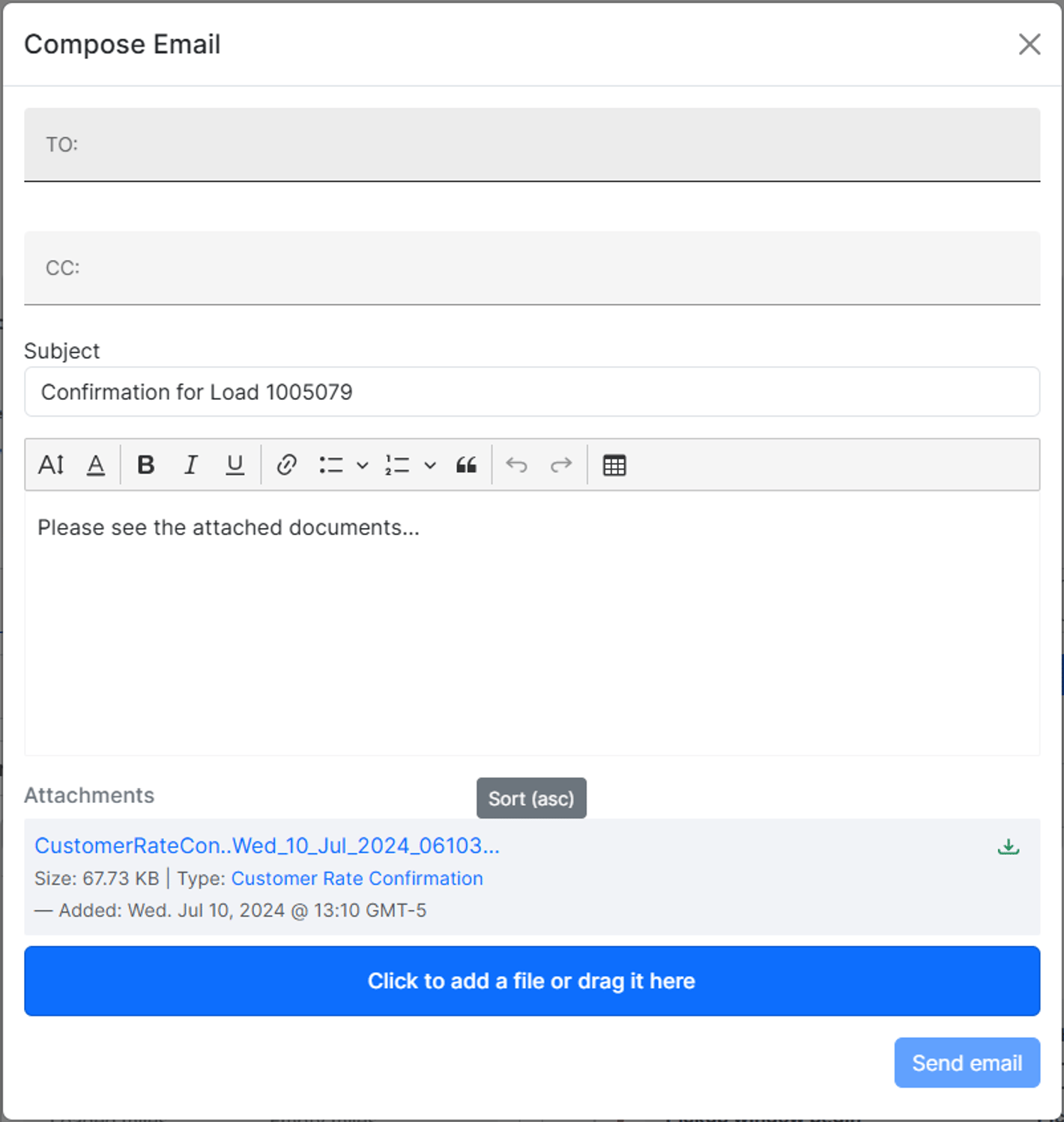
After generating the Customer Rate Confirmation, you can email it to the customer for review and signature:
1. In the Tender modal, select the checkbox next to the Customer Rate Confirmation.
2. Click the **Email Selected Documents** button to open the Compose Email window.
## Emailing the Customer Rate Confirmation
After generating the Customer Rate Confirmation, you can email it to the customer for review and signature:
1. In the Tender modal, select the checkbox next to the Customer Rate Confirmation.
2. Click the **Email Selected Documents** button to open the Compose Email window.
 ## Handling Signed Customer Rate Confirmations
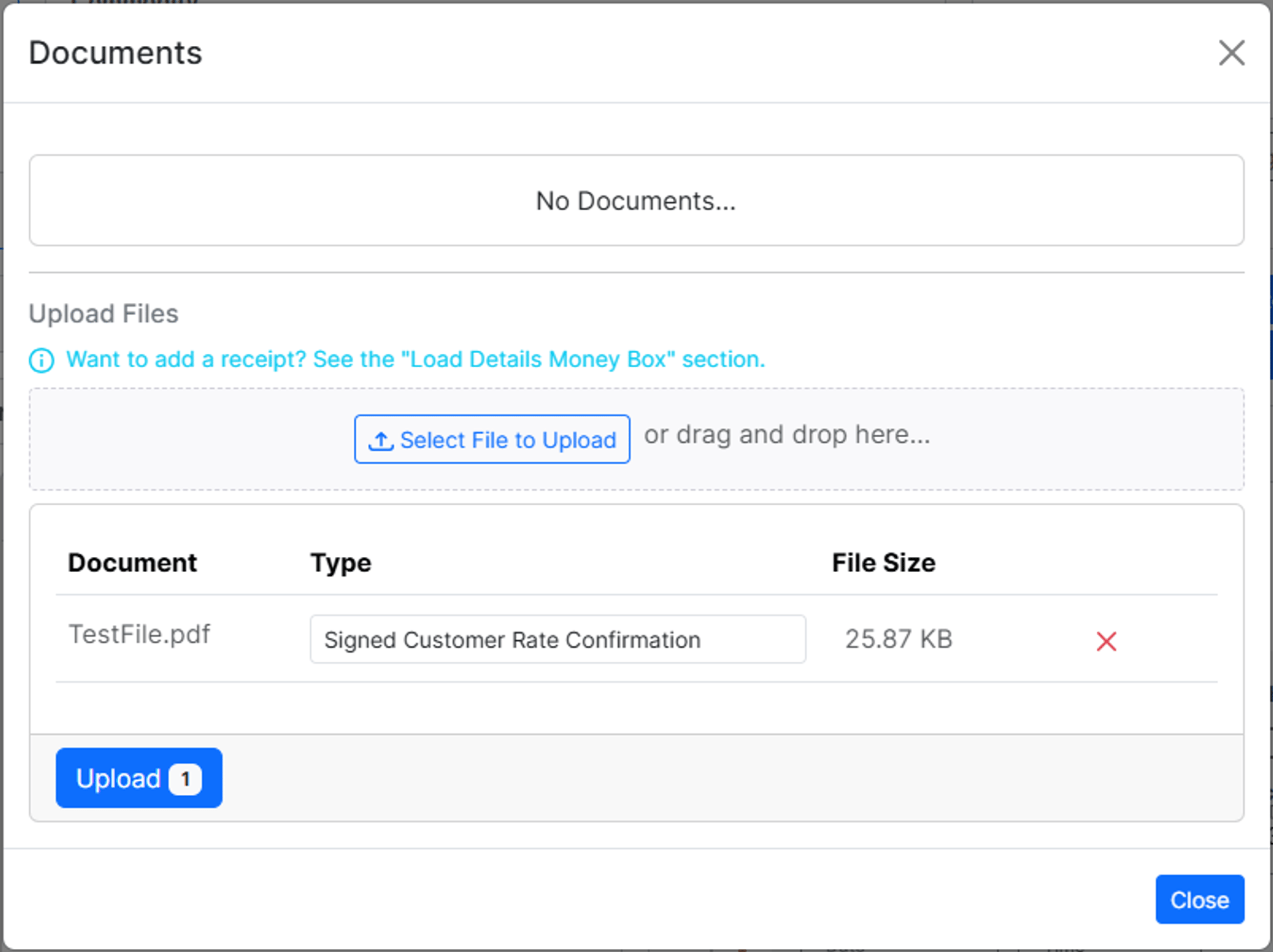
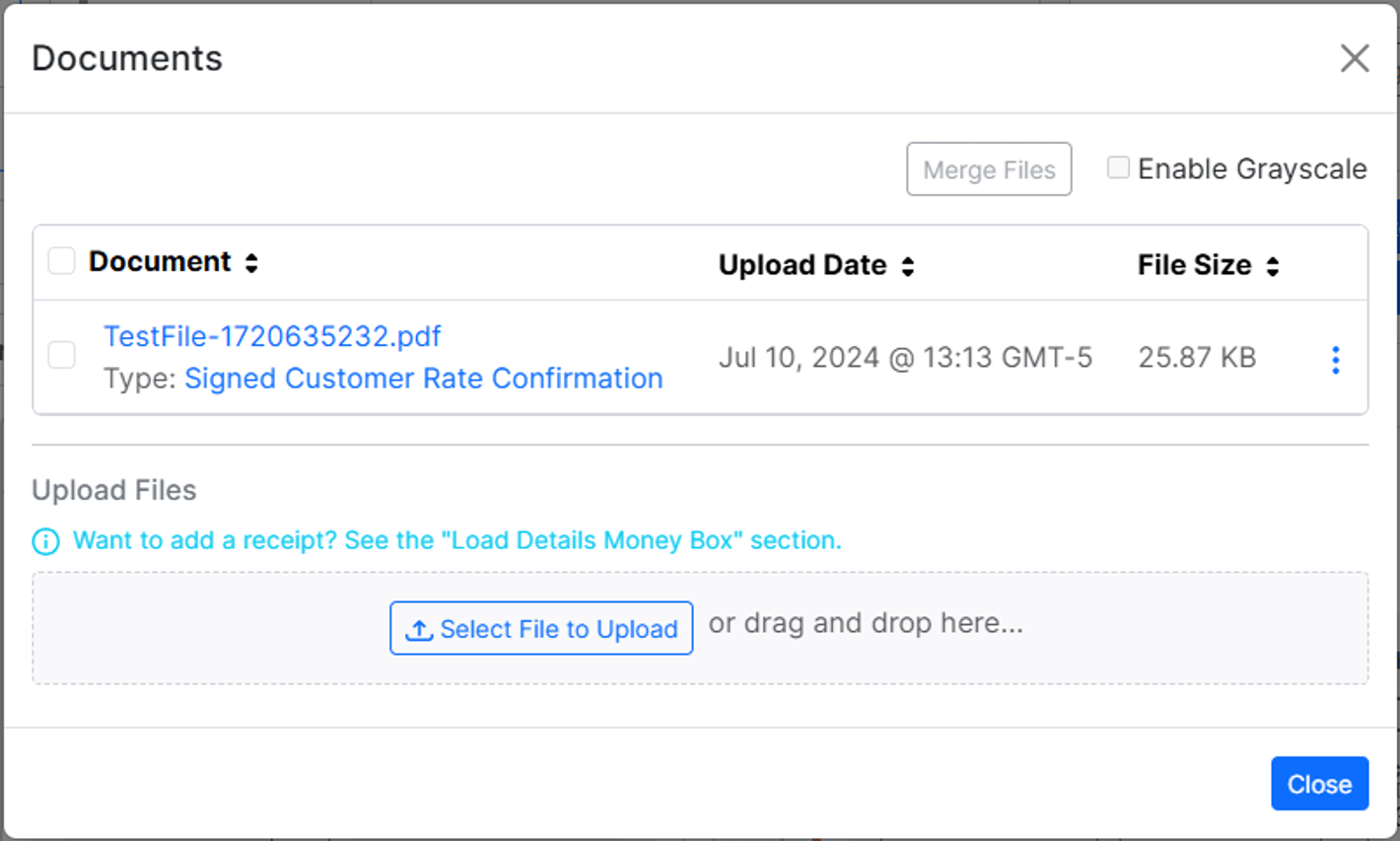
Currently, **e-signature functionality for Customer Rate Confirmations is not available.** Customers will need to sign the document using a third-party e-signature tool. Once signed, the document can be returned via email, and tenants can upload the signed Customer Rate Confirmation in the Documents modal using the document type **Signed Customer Rate Confirmation**.
## Handling Signed Customer Rate Confirmations
Currently, **e-signature functionality for Customer Rate Confirmations is not available.** Customers will need to sign the document using a third-party e-signature tool. Once signed, the document can be returned via email, and tenants can upload the signed Customer Rate Confirmation in the Documents modal using the document type **Signed Customer Rate Confirmation**.
 ## Customer Rate Confirmation Details
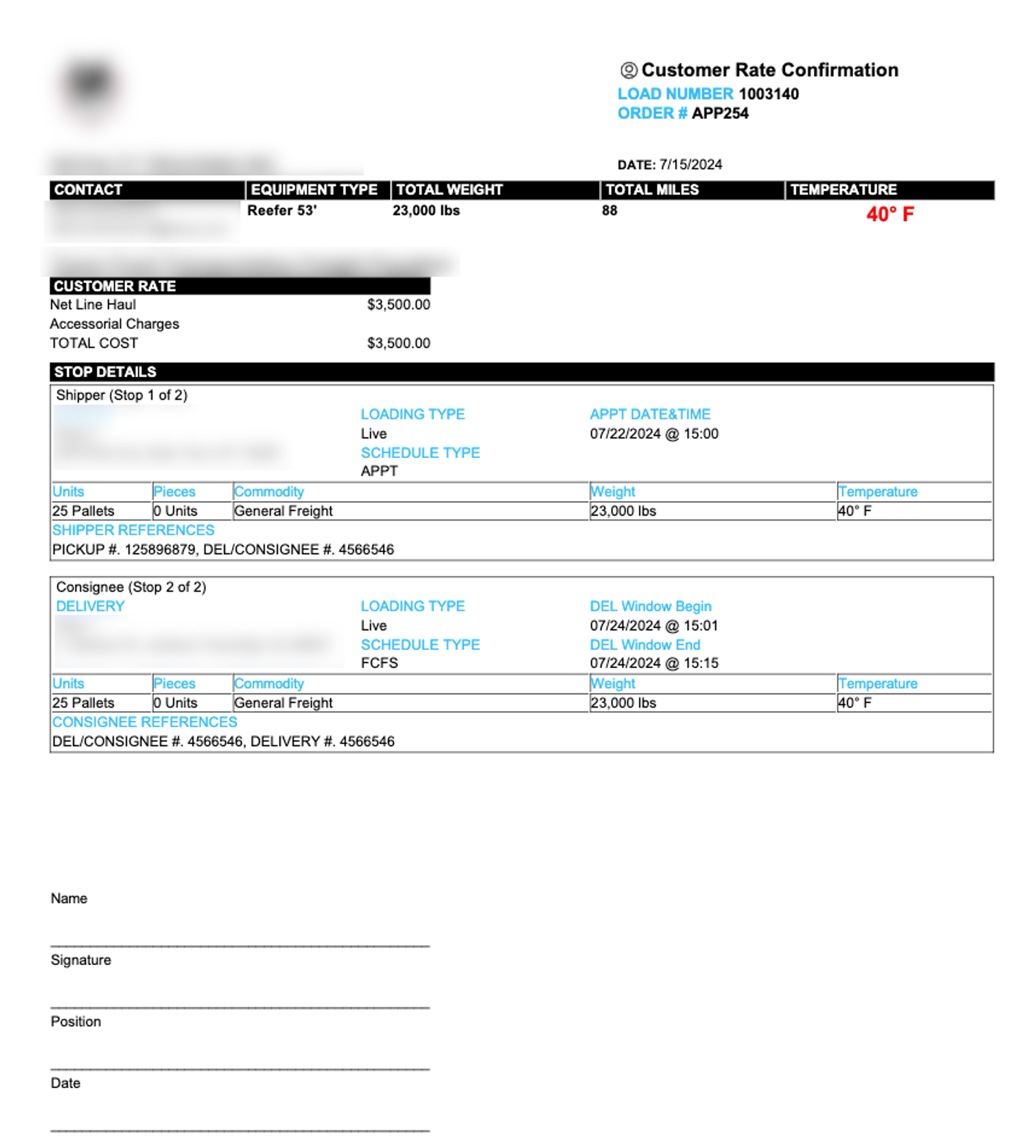
The Customer Rate Confirmation includes the following information:
* **Broker / Carrier Details:**
* Name
* Address
* Contact
* **Contact Details (of the person who generated the Rate Confirmation):**
* Name
* Contact
* **Customer Name**
* **Date** (generated)
* **Alvys Load Number**
* **Customer Order Number**
* **Total Weight**
* **Equipment Type**
* **Total Miles**
* **Temperature**
* **Commodity**
* **Stop Details**
* **Line Haul Rate**
* **Accessorial Charges**
* **Customer Signature Lines:**
* Name
* Signature
* Position
* Date
## Customer Rate Confirmation Details
The Customer Rate Confirmation includes the following information:
* **Broker / Carrier Details:**
* Name
* Address
* Contact
* **Contact Details (of the person who generated the Rate Confirmation):**
* Name
* Contact
* **Customer Name**
* **Date** (generated)
* **Alvys Load Number**
* **Customer Order Number**
* **Total Weight**
* **Equipment Type**
* **Total Miles**
* **Temperature**
* **Commodity**
* **Stop Details**
* **Line Haul Rate**
* **Accessorial Charges**
* **Customer Signature Lines:**
* Name
* Signature
* Position
* Date
 ## Documents Modal
### Context Menu Options
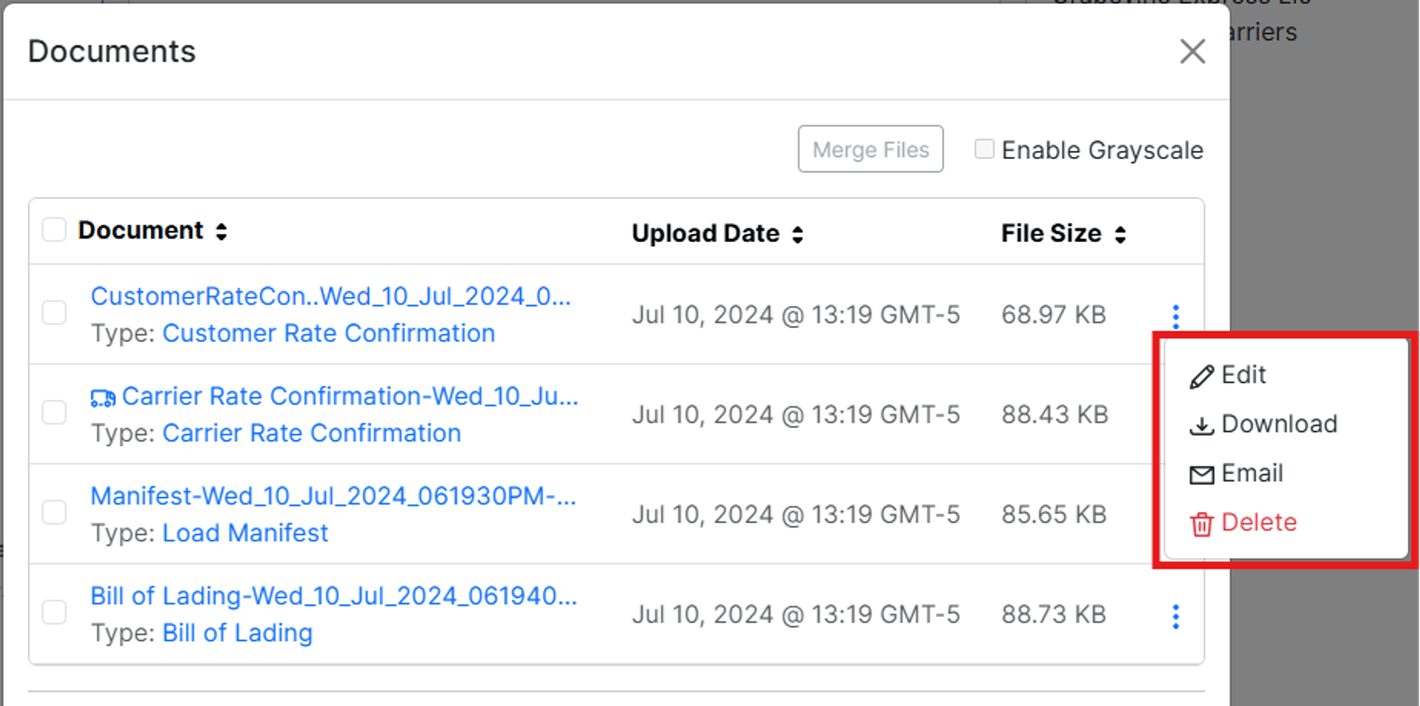
Options to Edit, Download, Email, and Delete documents are now stored in a context menu. Click the vertical ellipses to expand the menu and reveal these options.
## Documents Modal
### Context Menu Options
Options to Edit, Download, Email, and Delete documents are now stored in a context menu. Click the vertical ellipses to expand the menu and reveal these options.
 ### Merge Files
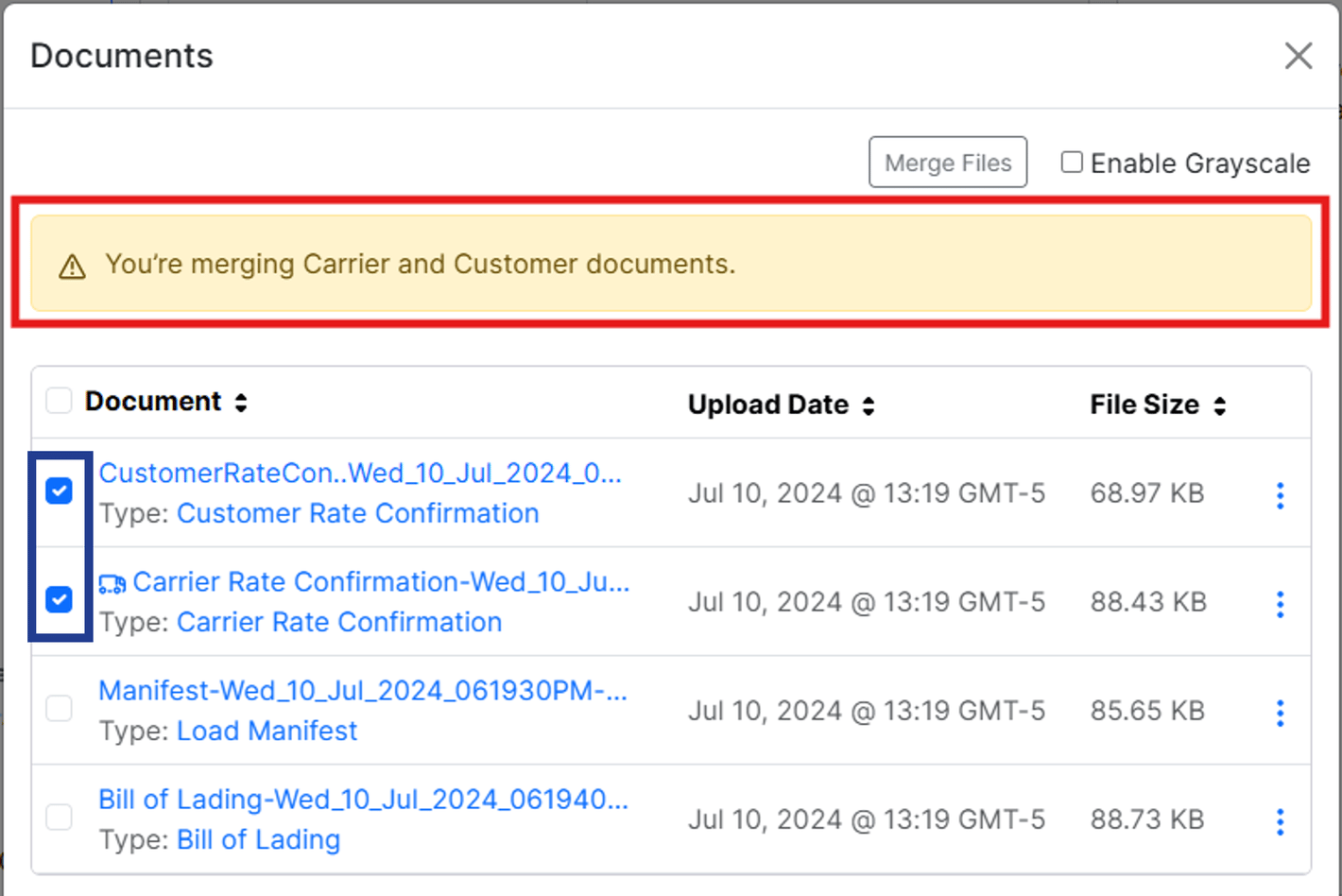
The Merge File function remains unchanged. However, a warning will be displayed if a user attempts to merge files meant for different audiences (carrier vs customer), informing them: **“You’re merging Carrier and Customer documents”**.
ℹ️ This warning **DOES NOT** prevent users from proceeding with the merge action.
### Merge Files
The Merge File function remains unchanged. However, a warning will be displayed if a user attempts to merge files meant for different audiences (carrier vs customer), informing them: **“You’re merging Carrier and Customer documents”**.
ℹ️ This warning **DOES NOT** prevent users from proceeding with the merge action.
 By following these steps, users can effectively generate, send, and manage Customer Rate Confirmations, ensuring all critical load details are formally documented and reducing the risk of disputes.