> ## Documentation Index
> Fetch the complete documentation index at: https://docs.alvys.com/llms.txt
> Use this file to discover all available pages before exploring further.
# October 2025 Releases
> October 2025 expands Driver Events with new granular types like Sick, Hometime, and Restart so Dispatch Assist can plan more precisely around time off.
In October 2025 we expanded Driver Events with new, granular event types so you can plan more precisely around a driver's scheduled time off and commitments.
## Overview
This page covers the product updates released in October 2025 (October release notes, What's New for October 2025). The release expanded the Driver Events feature with additional event types that give a more accurate way to block out a driver's calendar and feed higher-quality scheduling data into Dispatch Assist.
## What shipped in October 2025?
### Expanded Driver Event types for more precise time-off planning
Released October 3ʳᵈ. Driver Events now includes new, granular event types so you can record a driver's scheduled time off and commitments with more accuracy than before.
Previously the available event types were limited to Vacation, Restart, and Other, which meant relying on notes or generic categories and left gaps in the data. The expanded set lets you classify each event precisely, which improves planning around a specific driver's needs and provides higher-quality, structured data for the Dispatch Assist optimization model. Each event is classified as either a Hard Constraint (mandatory; cannot be violated) or a Soft Constraint (preference-based; can be overridden), so the optimizer avoids recommending assignments that conflict with a driver's time off.
The full set of event options is now available when you create an event:
* **Vacation:** scheduled paid time off.
* **Sick or Emergency:** urgent, unplanned time off due to illness or a medical appointment.
* **Restart:** a mandatory 34-hour hours-of-service reset period; used to confirm compliance.
* **Hometime:** a scheduled home visit or a specific personal event, such as a graduation.
* **Other:** a catch-all for miscellaneous, non-prohibitive events.
Who it affects: anyone who plans around driver availability, including those who dispatch loads and those who manage drivers. A What's New page is viewable by all users.
\*\*Where to find it: \*\*the updated event options are available in both the Dispatch Planners and on the Driver Profile page. When you create a new event you will see the full list of options, so you can quickly and accurately block out a driver's calendar.
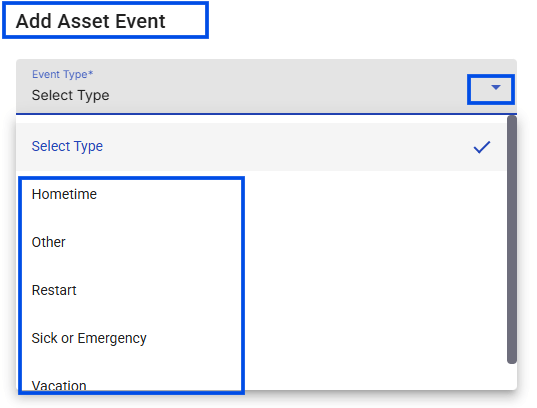 \*Image showing **Add Asset Event** form on a driver profile with the new event options. \*
\*\*Action needed: \*\*none. The expanded options are available automatically; start selecting the most specific event type when you schedule driver time off.
🎬 [Walkthrough video link of the expanded Driver Event types](https://www.loom.com/share/349c80b81fe748769ae1ea332240af8a)
\*Image showing **Add Asset Event** form on a driver profile with the new event options. \*
\*\*Action needed: \*\*none. The expanded options are available automatically; start selecting the most specific event type when you schedule driver time off.
🎬 [Walkthrough video link of the expanded Driver Event types](https://www.loom.com/share/349c80b81fe748769ae1ea332240af8a)