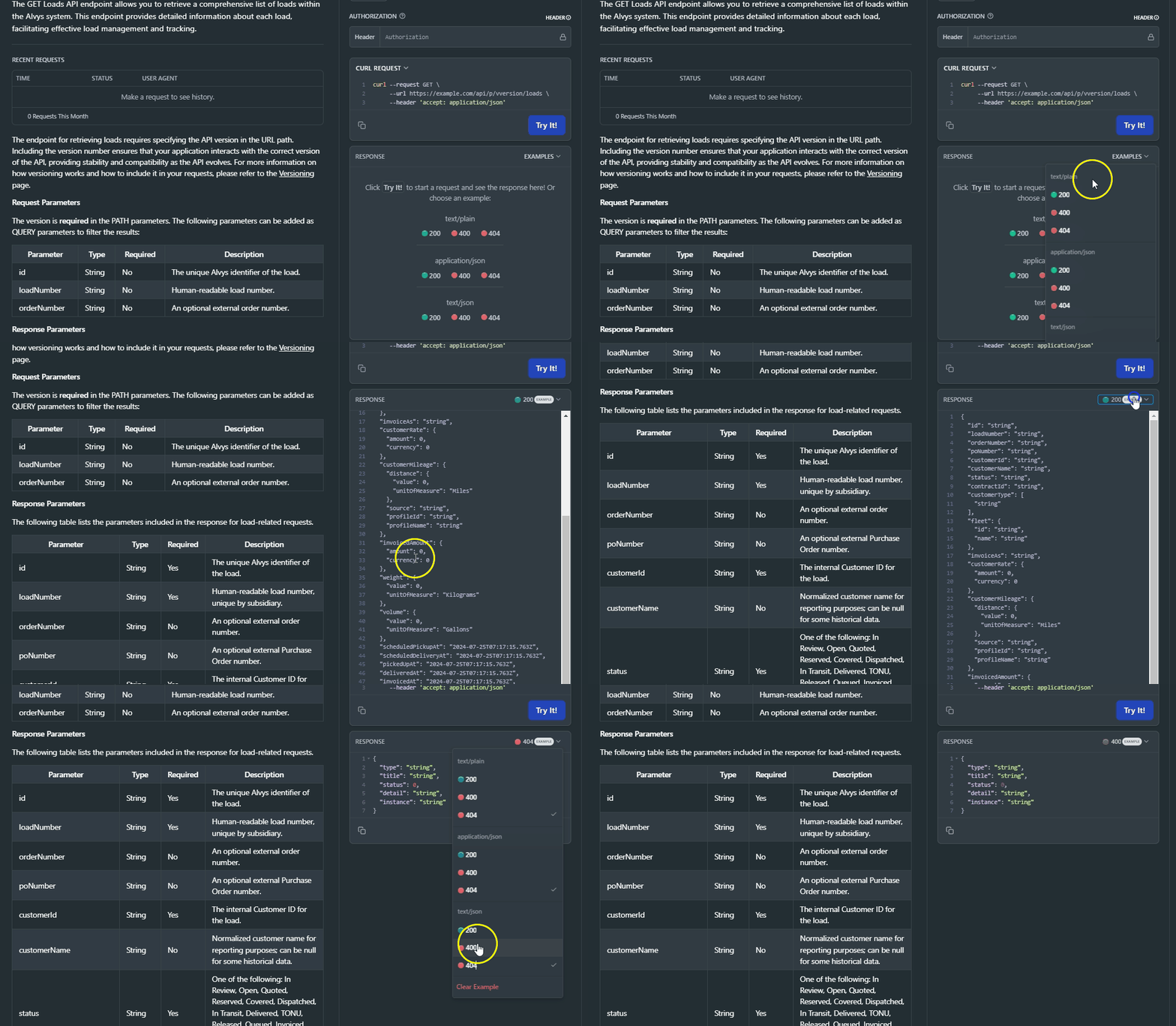
| Id | String | Yes | The unique identifier of the load. |
| LoadNumber | String | Yes | Human-readable load number, unique by subsidiary. |
| OrderNumber | String | No | An optional external order number. |
| PONumber | String | No | An optional external Purchase Order number. |
| CustomerId | String | Yes | The internal Customer ID for the load. |
| CustomerName | String | No | Normalized customer name for reporting purposes; can be null for some historical data. |
| CustomerNumber | String | No | The customer number associated with the load. |
| Status | String | Yes | One of the following: In Review, Open, Quoted, Reserved, Covered, Dispatched, In Transit, Delivered, TONU, Released, Queued, Invoiced, Financed, Completed, Paid, Cancelled. |
| TenderId | String | No | The identifier of the inbound EDI tender that created this load. null if the load was created manually or through a non-tender channel. |
| ContractId | String | No | Optional Customer Contract ID. |
| CustomerType | List <String> | Yes | The type of customer this load is associated with. |
| Stops | Array of Objects | Yes | List of stops associated with the load. |
| Fleet | Object | No | Information about the fleet associated with the load. |
| Fleet.Id | String | No | The unique identifier of the fleet. |
| Fleet.Name | String | No | The name of the fleet. |
| Fleet.InvoiceNumberPrefix | String | No | The invoice number prefix used by the fleet. |
| InvoiceAs | String | Yes | The subsidiary or company information used when invoicing this load. |
| OfficeId | String | No | This value corresponds to the internal Office ID associated with the load. |
| Linehaul | Object | No | The cost of transporting the load, excluding additional fees such as fuel surcharges or accessorials. |
| Linehaul.Amount | Number | No | The numeric value of the linehaul charge. |
| Linehaul.Currency | String | No | The currency of the linehaul charge. |
| FuelSurcharge | Object | No | The additional charge applied to cover fluctuating fuel costs. |
| FuelSurcharge.Amount | Number | No | The numeric value of the fuel surcharge. |
| FuelSurcharge.Currency | String | No | The currency of the fuel surcharge. |
| CustomerAccessorials | Object | No | Additional charges beyond the base rate and fuel surcharge, such as detention or lumper fees. |
| CustomerAccessorials.Amount | Number | No | The numeric value of the accessorial charges. |
| CustomerAccessorials.Currency | String | No | The currency of the accessorial charges. |
| CustomerRate | Object | No | Information about the rate charged to the customer for the load. |
| CustomerRate.Amount | Number | No | The numeric amount of the customer rate, which includes all applicable customer accessorials like Linehaul (LH) + Fuel Surcharge (FSC) + Accessorials (ACC). |
| CustomerRate.Currency | String | No | The currency of the customer rate. |
| CustomerMileage | Object | No | Information about the mileage associated with the load. |
| CustomerMileage.Distance | Object | No | Information about the distance details. |
| CustomerMileage.Distance.Value | Number | No | The numeric value of the distance. |
| CustomerMileage.Distance.UnitOfMeasure | String | No | The unit of measure for the distance, e.g., Miles. |
| CustomerMileage.Source | String | No | The source of the mileage data. |
| CustomerMileage.ProfileId | String | No | The profile ID used for the mileage data. |
| CustomerMileage.ProfileName | String | No | The profile name used for the mileage data. |
| InvoicedAmount | Object | No | Information about the total amount invoiced for the load. |
| InvoicedAmount.Amount | Number | No | The numeric amount invoiced. |
| InvoicedAmount.Currency | String | No | The currency of the invoiced amount. |
| Weight | Object | No | Information about the weight of the load. |
| Weight.Value | Number | No | The numeric value of the weight. |
| Weight.UnitOfMeasure | String | No | The unit of measure for the weight, e.g., Kilograms. |
| Volume | Object | No | Information about the volume of the load. |
| Volume.Value | Number | No | The numeric value of the volume. |
| Volume.UnitOfMeasure | String | No | The unit of measure for the volume, e.g., Gallons. |
| ScheduledPickupAt | String | No | Scheduled pick-up date and time. |
| ScheduledDeliveryAt | String | No | Scheduled delivery date and time. |
| PickedUpAt | String | No | Actual pick-up time, always in UTC. |
| DeliveredAt | String | No | Actual delivery time, always in UTC. |
| InvoicedAt | String | No | Date and time when the first invoice was generated. |
| LastInvoiceSentAt | String (DateTime) | No | The timestamp of the most recent successful submission of an invoice from the Load Details page. |
| Notes | Array of Objects | Yes | List of notes associated with the load. |
| CreatedAt | String (DateTime) | Yes | The date and time when the load was created. |
| CreatedBy | String | Yes | The user who created the load. |
| CancelledAt | String (DateTime) | No | The date and time when the load was cancelled. |
| CancelledBy | String | No | The user who cancelled the load. |
| References | Object | No | Information about references associated with the load. |
| References.Id | String | No | The unique identifier of the reference. |
| References.Name | String | No | The name of the reference. |
| References.Value | String | No | The value of the reference. |
| References.Type | String | No | The data type of the reference, e.g., Text, Date, Bool, or List. |
| References.Access | String | No | The access level of the reference, e.g., Internal or Public. |
| CustomerServiceRepId | String | No | The unique identifier of the Customer Service Representative assigned to the load. |
| CustomerSalesAgentId | String | No | The unique identifier of the Customer Sales Agent assigned to the load. |
| CustomerSalesManagerId | String | No | The unique identifier of the Customer Sales Manager assigned to the load. |
| CustomerLoadPlannerId | String | No | The unique identifier of the Customer Load Planner assigned to the load. |
| CustomerAccountManagerId | String | No | The unique identifier of the Customer Account Manager assigned to the load. |
| UpdatedAt | String | No | The date and time when the load was last updated. |
| UpdatedBy | String | No | The user who last updated the load. |
| PaidAt | String (DateTime) | No | Timestamp when a customer payment was recorded against this load. |
| TotalPaid | Object | No | Total amount paid by the customer to date. |
| TotalPaid.Amount | Number | No | The numeric total amount paid by the customer to date. |
| TotalPaid.Currency | String | No | The currency of the total paid amount. |
| Payments | Array of Objects | No | Array of individual customer payment records. |
| Payments[].Id | String | No | The unique identifier of the payment record. |
| Payments[].Amount.Amount | Number | No | The numeric amount of the payment. |
| Payments[].Amount.Currency | String | No | The currency of the payment amount. |
| Payments[].PaidAt | String (DateTime) | No | The date and time when the payment was recorded. |
| TenderId | String | No | The identifier of the inbound EDI tender that created this load. null if the load was created manually or through a non-tender channel. |
| IsDeleted | Boolean | No | Indicates whether the load is deleted. |
| RequiredEquipment | List <String> | No | The required equipment for this load. |
| LoadType | String | No | The LoadType field indicates whether a load is "Revenue" or "Non-Revenue". |
| CustomerAccessorialsDetails | Array of Objects | No | List of accessorial charges for the customer on the load. |
| CustomerAccessorialsDetails[].Id | String | No | Unique ID of the accessorial. |
| CustomerAccessorialsDetails[].Type | String | No | Type of accessorial (e.g., Detention, Layover, Fuel Surcharge). |
| CustomerAccessorialsDetails[].Total.Amount | Number | No | Total charge amount of the accessorial. |
| CustomerAccessorialsDetails[].Total.Currency | String | No | Currency of the total amount (e.g., USD). |
| CustomerAccessorialsDetails[].Rate.Amount | Number | No | Unit rate applied to the accessorial. |
| CustomerAccessorialsDetails[].Rate.Currency | String | No | Currency of the unit rate. |
| CustomerAccessorialsDetails[].RateType | String | No | How the rate is calculated (e.g., Flat, PerHour, PerMile). |
| CustomerAccessorialsDetails[].Uom | String | No | Unit of measure (e.g., Hour, Mile, Stop). |
| CustomerAccessorialsDetails[].Quantity | Number | No | Quantity multiplied by the rate to compute the total. |
| CustomerAccessorialsDetails[].IsPaid | Boolean | No | If present, indicates whether the accessorial has been paid. |
| CustomerAccessorialsDetails[].StopId | String | No | ID of the related stop, if the accessorial is stop-specific (e.g., Detention). |
| CustomerAccessorialsDetails[].CreatedAt | String (DateTime) | No | Timestamp when the accessorial was created (UTC). |
| CustomerAccessorialsDetails[].UpdatedAt | String (DateTime) | No | Timestamp when the accessorial was last updated (UTC). |