> ## Documentation Index
> Fetch the complete documentation index at: https://docs.alvys.com/llms.txt
> Use this file to discover all available pages before exploring further.
# List users
> List user accounts in your Alvys tenant, including full name, email, role assignments, subsidiary access, and enabled or disabled account status.
The List Users API endpoint is used for fetching comprehensive details of all users, helping administrators and managers keep track of user accounts and their associated roles and permissions within the Alvys system. The inclusion of versioning in the URL path ensures compatibility with different API versions as the platform evolves. For more information on versioning, refer to the [Versioning](/docs/versioning) page.
### Request Parameters
The following parameter is required in the URL path:
| Parameter | Type | Required | Description |
| --------- | ------ | -------- | --------------------------------------- |
| version | String | Yes | The version of the API being requested. |
#### Example CURL request
```bash theme={null}
curl --location 'https://integrations.alvys.com/api/p/v{version}/users/list' \
--header 'Authorization: Bearer YOUR_ACCESS_TOKEN'
```
Replace `{version}` with the API version number and `YOUR_ACCESS_TOKEN` with your actual Bearer token.
```bash theme={null}
curl --location 'https://integrations.alvys.com/api/p/v1/users/list' \
--header 'Authorization: Bearer eyJhbGciOiJSUzI1NiIsInR5cCI6IkpXVCJ...'
```
### Response Parameters
The response contains a list of users, each represented by the following parameters:
| Parameter | Type | Description |
| ----------- | ------------------ | ------------------------------------------------------------------------------------------------------------------------- |
| Id | String | The unique identifier of the user. |
| UserName | String | The username of the user. |
| Name | String | The full name of the user. |
| Email | String | The email address of the user. |
| UserType | String | The type of user (e.g., Internal, External). |
| Role | String | The role assigned to the user (e.g., Admin, Dispatcher, Driver, Biller, SalesAgent, DataEntry, Safety, OperationManager). |
| Phone | String | The phone number of the user. |
| CompanyCode | String | The code of the company the user is associated with. |
| Status | String | The current status of the user (e.g., Active, Disabled, Deleted). |
| Permissions | Array of Strings | A list of permissions assigned to the user. |
| CreatedAt | String (Date-Time) | The date and time when the user was created. |
| ModifiedAt | String (Date-Time) | The date and time when the user's details were last modified. |
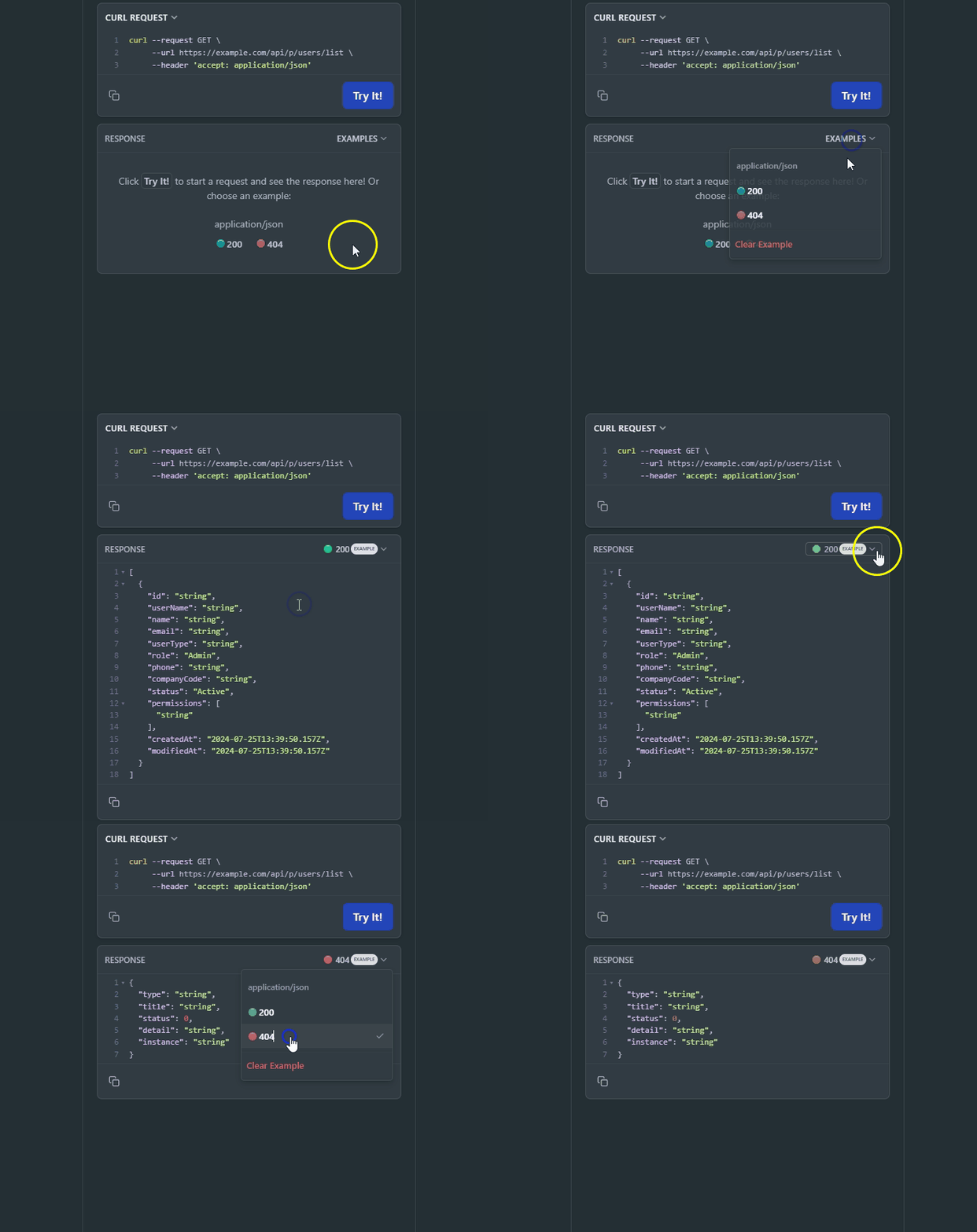
#### Example Response
On the right side, you can see examples of different error codes by clicking "Example" and selecting the response code.
 #### Rate Limits
All endpoints are subject to rate limits to protect the API from traffic spikes. For detailed information on rate limits, please refer to the [Rate Limits](#rate-limits) section.
This page is interactive, allowing you to try a request without any parameters. The Curl command on the right side of the page will be automatically updated. Alternatively, you can directly edit the Curl command. Make sure to authorize yourself before trying a request.
## OpenAPI
````yaml GET /api/p/v{version}/users/list
openapi: 3.0.1
info:
title: Alvys
description: >-
Alvys provides a robust set of REST APIs to allow you to integrate Alvys
into virtually any platform. These APIs cover most of Alvys' major product
areas with additional endpoints being added regularly based on customer
requests.
contact:
name: Alvys Support
url: https://www.alvys.com/resources/contact/
version: v1
servers:
- url: https://integrations.alvys.com
description: Public API Server
- url: https://api.alvys.com/
description: Public API Server
security:
- Public: []
tags:
- name: Authentication
description: Obtain an OAuth 2.0 access token for the Alvys Public API.
- name: Carrier Settlement Statements
description: >-
Search carrier settlement statements and retrieve a single statement by
number.
- name: Carriers
description: Read carrier records, search carriers, and manage carrier documents.
- name: Customers
description: Create, read, update, delete, and search customer records.
- name: Deductions
description: >-
Create one-time deductions and search or delete existing deduction
records.
- name: DispatchPreferences
description: Dispatch preferences endpoints for reading dispatch rules and preferences.
- name: Driver Settlement Statements
description: >-
Search driver settlement statements and retrieve a single statement by
number.
- name: Drivers
description: >-
Read driver records, search drivers and driver events, and manage driver
documents.
- name: Fuel
description: Read and search fuel transactions.
- name: Invoices
description: >-
Read invoices, create carrier invoices, and record carrier and customer
payments.
- name: Loads
description: Read, update, search loads, and manage load documents and notes.
- name: Locations
description: Read and search company location details.
- name: Maintenance
description: Read and search maintenance records.
- name: Tenders
description: Create, accept, reject, cancel, update, and search inbound EDI tenders.
- name: Tolls
description: Read and search toll transactions.
- name: Trailers
description: Read trailers, search trailer events, and manage trailer documents.
- name: Trips
description: >-
Read, search trips, manage trip documents, and record stop appointments,
arrivals, and departures.
- name: Trucks
description: Read trucks, search truck events, and manage truck documents.
- name: Users
description: List and search users.
- name: Visibility
description: >-
Read inbound and outbound visibility history and search outbound
visibility errors.
- name: Webhooks
description: >-
Create, read, update, delete, enable, disable, verify, test, and rotate
secrets for webhook subscriptions; read event types, delivery logs, and
health metrics.
paths:
/api/p/v{version}/users/list:
get:
tags:
- Users
summary: List users
parameters:
- name: version
in: path
description: API version (e.g., 1.0)
required: true
schema:
type: string
default: '1.0'
example: '1.0'
responses:
'200':
description: OK
content:
application/json:
schema:
type: array
items:
$ref: '#/components/schemas/Alvys.Models.Users.UserDto'
'401':
description: Unauthorized
content:
application/problem+json:
schema:
$ref: '#/components/schemas/Microsoft.AspNetCore.Mvc.ProblemDetails'
'403':
description: Forbidden
content:
application/problem+json:
schema:
$ref: '#/components/schemas/Microsoft.AspNetCore.Mvc.ProblemDetails'
'404':
description: Not Found
content:
application/json:
schema:
$ref: '#/components/schemas/Microsoft.AspNetCore.Mvc.ProblemDetails'
'429':
description: Too Many Requests
content:
application/problem+json:
schema:
$ref: '#/components/schemas/Microsoft.AspNetCore.Mvc.ProblemDetails'
security:
- Public: []
components:
schemas:
Alvys.Models.Users.UserDto:
required:
- CompanyCode
- Id
- Name
- Permissions
- Role
- Status
- UserName
- UserType
type: object
properties:
Id:
type: string
UserName:
type: string
Name:
type: string
Email:
type: string
nullable: true
UserType:
type: string
Role:
allOf:
- $ref: '#/components/schemas/Alvys.Models.Users.UserDtoUserRole'
Phone:
type: string
nullable: true
CompanyCode:
type: string
Status:
allOf:
- $ref: '#/components/schemas/Alvys.Models.Users.UserDtoUserStatus'
Permissions:
type: array
items:
type: string
CreatedAt:
type: string
format: date-time
nullable: true
ModifiedAt:
type: string
format: date-time
nullable: true
additionalProperties: false
Microsoft.AspNetCore.Mvc.ProblemDetails:
type: object
properties:
Type:
type: string
nullable: true
Title:
type: string
nullable: true
Status:
type: integer
format: int32
nullable: true
Detail:
type: string
nullable: true
Instance:
type: string
nullable: true
additionalProperties: {}
Alvys.Models.Users.UserDtoUserRole:
enum:
- Admin
- Dispatcher
- Driver
- Biller
- SalesAgent
- DataEntry
- Safety
- OperationManager
type: string
Alvys.Models.Users.UserDtoUserStatus:
enum:
- Active
- Disabled
- Deleted
type: string
securitySchemes:
Public:
type: http
scheme: bearer
bearerFormat: JWT
description: >-
OAuth 2.0 client-credentials access token. Obtain one from
https://auth.alvys.com/oauth/token (grant_type=client_credentials,
audience=https://api.alvys.com/public/), then paste it here. The
playground sends it as `Authorization: Bearer `.
````
#### Rate Limits
All endpoints are subject to rate limits to protect the API from traffic spikes. For detailed information on rate limits, please refer to the [Rate Limits](#rate-limits) section.
This page is interactive, allowing you to try a request without any parameters. The Curl command on the right side of the page will be automatically updated. Alternatively, you can directly edit the Curl command. Make sure to authorize yourself before trying a request.
## OpenAPI
````yaml GET /api/p/v{version}/users/list
openapi: 3.0.1
info:
title: Alvys
description: >-
Alvys provides a robust set of REST APIs to allow you to integrate Alvys
into virtually any platform. These APIs cover most of Alvys' major product
areas with additional endpoints being added regularly based on customer
requests.
contact:
name: Alvys Support
url: https://www.alvys.com/resources/contact/
version: v1
servers:
- url: https://integrations.alvys.com
description: Public API Server
- url: https://api.alvys.com/
description: Public API Server
security:
- Public: []
tags:
- name: Authentication
description: Obtain an OAuth 2.0 access token for the Alvys Public API.
- name: Carrier Settlement Statements
description: >-
Search carrier settlement statements and retrieve a single statement by
number.
- name: Carriers
description: Read carrier records, search carriers, and manage carrier documents.
- name: Customers
description: Create, read, update, delete, and search customer records.
- name: Deductions
description: >-
Create one-time deductions and search or delete existing deduction
records.
- name: DispatchPreferences
description: Dispatch preferences endpoints for reading dispatch rules and preferences.
- name: Driver Settlement Statements
description: >-
Search driver settlement statements and retrieve a single statement by
number.
- name: Drivers
description: >-
Read driver records, search drivers and driver events, and manage driver
documents.
- name: Fuel
description: Read and search fuel transactions.
- name: Invoices
description: >-
Read invoices, create carrier invoices, and record carrier and customer
payments.
- name: Loads
description: Read, update, search loads, and manage load documents and notes.
- name: Locations
description: Read and search company location details.
- name: Maintenance
description: Read and search maintenance records.
- name: Tenders
description: Create, accept, reject, cancel, update, and search inbound EDI tenders.
- name: Tolls
description: Read and search toll transactions.
- name: Trailers
description: Read trailers, search trailer events, and manage trailer documents.
- name: Trips
description: >-
Read, search trips, manage trip documents, and record stop appointments,
arrivals, and departures.
- name: Trucks
description: Read trucks, search truck events, and manage truck documents.
- name: Users
description: List and search users.
- name: Visibility
description: >-
Read inbound and outbound visibility history and search outbound
visibility errors.
- name: Webhooks
description: >-
Create, read, update, delete, enable, disable, verify, test, and rotate
secrets for webhook subscriptions; read event types, delivery logs, and
health metrics.
paths:
/api/p/v{version}/users/list:
get:
tags:
- Users
summary: List users
parameters:
- name: version
in: path
description: API version (e.g., 1.0)
required: true
schema:
type: string
default: '1.0'
example: '1.0'
responses:
'200':
description: OK
content:
application/json:
schema:
type: array
items:
$ref: '#/components/schemas/Alvys.Models.Users.UserDto'
'401':
description: Unauthorized
content:
application/problem+json:
schema:
$ref: '#/components/schemas/Microsoft.AspNetCore.Mvc.ProblemDetails'
'403':
description: Forbidden
content:
application/problem+json:
schema:
$ref: '#/components/schemas/Microsoft.AspNetCore.Mvc.ProblemDetails'
'404':
description: Not Found
content:
application/json:
schema:
$ref: '#/components/schemas/Microsoft.AspNetCore.Mvc.ProblemDetails'
'429':
description: Too Many Requests
content:
application/problem+json:
schema:
$ref: '#/components/schemas/Microsoft.AspNetCore.Mvc.ProblemDetails'
security:
- Public: []
components:
schemas:
Alvys.Models.Users.UserDto:
required:
- CompanyCode
- Id
- Name
- Permissions
- Role
- Status
- UserName
- UserType
type: object
properties:
Id:
type: string
UserName:
type: string
Name:
type: string
Email:
type: string
nullable: true
UserType:
type: string
Role:
allOf:
- $ref: '#/components/schemas/Alvys.Models.Users.UserDtoUserRole'
Phone:
type: string
nullable: true
CompanyCode:
type: string
Status:
allOf:
- $ref: '#/components/schemas/Alvys.Models.Users.UserDtoUserStatus'
Permissions:
type: array
items:
type: string
CreatedAt:
type: string
format: date-time
nullable: true
ModifiedAt:
type: string
format: date-time
nullable: true
additionalProperties: false
Microsoft.AspNetCore.Mvc.ProblemDetails:
type: object
properties:
Type:
type: string
nullable: true
Title:
type: string
nullable: true
Status:
type: integer
format: int32
nullable: true
Detail:
type: string
nullable: true
Instance:
type: string
nullable: true
additionalProperties: {}
Alvys.Models.Users.UserDtoUserRole:
enum:
- Admin
- Dispatcher
- Driver
- Biller
- SalesAgent
- DataEntry
- Safety
- OperationManager
type: string
Alvys.Models.Users.UserDtoUserStatus:
enum:
- Active
- Disabled
- Deleted
type: string
securitySchemes:
Public:
type: http
scheme: bearer
bearerFormat: JWT
description: >-
OAuth 2.0 client-credentials access token. Obtain one from
https://auth.alvys.com/oauth/token (grant_type=client_credentials,
audience=https://api.alvys.com/public/), then paste it here. The
playground sends it as `Authorization: Bearer `.
````