> ## Documentation Index
> Fetch the complete documentation index at: https://docs.alvys.com/llms.txt
> Use this file to discover all available pages before exploring further.
# Webhook Lifecycle & Configuration
> Create, configure, and manage Alvys webhook subscriptions per Subsidiary, including event selection, Include Previous Values, and lifecycle states.
Webhooks are configured from **Settings → Connections → Webhooks**.
Each webhook belongs to a specific Subsidiary. When you switch subsidiaries in the UI, you are viewing and managing webhooks for that Subsidiary only. Events are delivered only within that Subsidiary’s context.
**Webhook Availability Notice**
Webhooks are currently available by request.
To enable this functionality for your account, please contact your Customer Success Manager or Implementation Manager.
## Creating a Webhook
1. Navigate to **Settings → Webhooks**
2. Select a **Subsidiary**
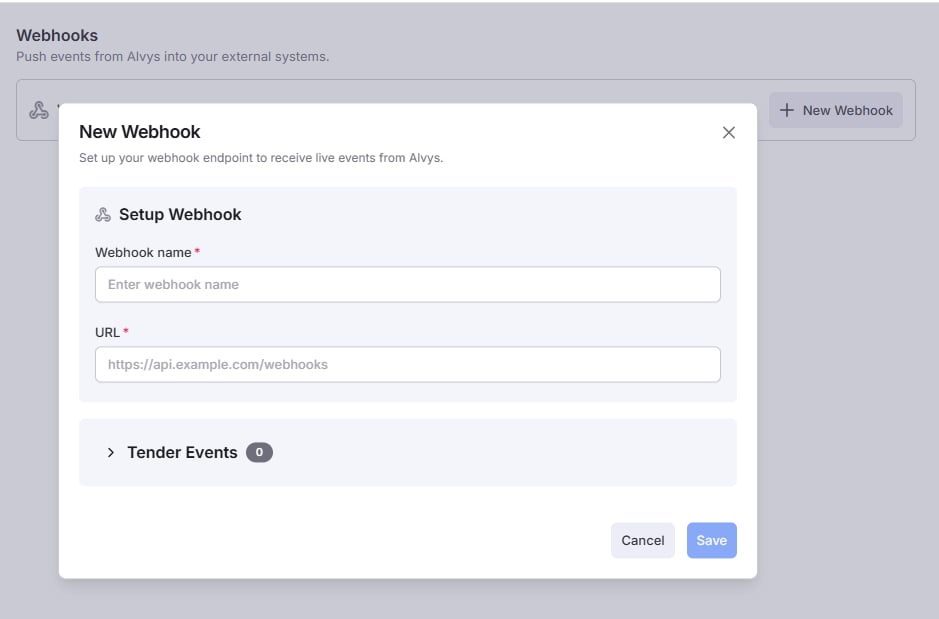
3. Click **Create Webhook**
4. Provide:
* **Name**
* **Endpoint URL** (HTTPS required)
* **At least one subscribed event**
The endpoint must be publicly accessible over HTTPS and support TLS 1.2 or higher.
 After saving:
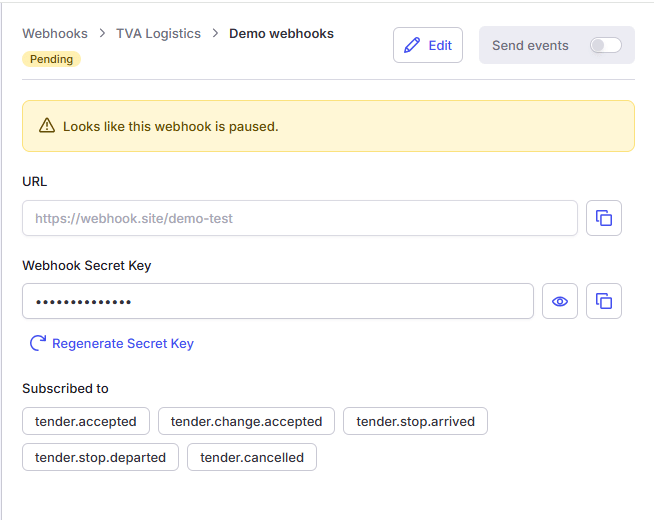
* A signing secret is generated.
* The webhook is created in a **Pending** state.
* No events are delivered until the webhook is enabled and verified.
After saving:
* A signing secret is generated.
* The webhook is created in a **Pending** state.
* No events are delivered until the webhook is enabled and verified.
 ## Enabling a Webhook
Webhooks are activated using the **Send Events** toggle.
When enabled, Alvys verifies ownership of your endpoint before delivering business events.
### Endpoint Verification
When activation is triggered, Alvys sends an HTTPS POST request to your configured endpoint.
#### Request
```
POST https://your-endpoint.com/webhook
```
Headers:
```
Content-Type: application/json; charset=utf-8
User-Agent: Alvys-Webhook/1.0
X-Alvys-Event: webhook.verification
X-Alvys-Challenge: {random_token}
traceparent: {w3c-trace-id}
```
Body:
```json theme={null}
{
"type": "webhook.verification",
"challenge": "{random_token}"
}
```
Verification requests are **not signed**.
### Required Response
Your endpoint must respond within **30 seconds**:
Status:
```
200 OK
```
Body:
```json theme={null}
{
"challenge": "{the_same_random_token}"
}
```
Requirements:
* The response must be valid JSON.
* The property name must be exactly `challenge`.
* The value must match exactly (case-sensitive).
* Do not wrap the response.
* Do not return plain text.
If verification succeeds:
* The webhook status changes to Active
* The UI status indicator turns green and displays Connected
* Business events begin to be delivered to the endpoint
If verification fails:
* The webhook remains Disabled
* The UI displays a failed verification state
* No events are delivered
## Webhook States
A webhook may be in one of the following states:
* **Disabled** — Not delivering events
* **Pending** — Pending Verification in progress
* **Connected** — Verified and delivering events
* **Failed to verify** — Verification attempt failed
## Enabling a Webhook
Webhooks are activated using the **Send Events** toggle.
When enabled, Alvys verifies ownership of your endpoint before delivering business events.
### Endpoint Verification
When activation is triggered, Alvys sends an HTTPS POST request to your configured endpoint.
#### Request
```
POST https://your-endpoint.com/webhook
```
Headers:
```
Content-Type: application/json; charset=utf-8
User-Agent: Alvys-Webhook/1.0
X-Alvys-Event: webhook.verification
X-Alvys-Challenge: {random_token}
traceparent: {w3c-trace-id}
```
Body:
```json theme={null}
{
"type": "webhook.verification",
"challenge": "{random_token}"
}
```
Verification requests are **not signed**.
### Required Response
Your endpoint must respond within **30 seconds**:
Status:
```
200 OK
```
Body:
```json theme={null}
{
"challenge": "{the_same_random_token}"
}
```
Requirements:
* The response must be valid JSON.
* The property name must be exactly `challenge`.
* The value must match exactly (case-sensitive).
* Do not wrap the response.
* Do not return plain text.
If verification succeeds:
* The webhook status changes to Active
* The UI status indicator turns green and displays Connected
* Business events begin to be delivered to the endpoint
If verification fails:
* The webhook remains Disabled
* The UI displays a failed verification state
* No events are delivered
## Webhook States
A webhook may be in one of the following states:
* **Disabled** — Not delivering events
* **Pending** — Pending Verification in progress
* **Connected** — Verified and delivering events
* **Failed to verify** — Verification attempt failed
## Updating a Webhook
### Changing the Endpoint URL
If the endpoint URL is updated:
* The webhook is automatically set to **Pending**
* Verification is required again
* No events are delivered until verification succeeds
### Updating Subscribed Events
Changes to event selection:
* Take effect immediately
* Do not require verification
## Include Previous Values
On `load.changed` and `trip.changed` events, Alvys can include the previous value of every changed field via `data.diff.previousAttributes`, so your integration can apply just the delta instead of re-syncing the whole record.
This is **opt-in per webhook**:
* Enable the **Include previous values** option on the webhook (or set `IncludePreviousAttributes` to `true` via the API — see [Create webhook](/reference/webhooks/create-webhook-subscription)).
* Defaults to **off**. When off, `load.changed` / `trip.changed` events still include `data.diff.changes` (what changed) but not the previous values.
* Changes take effect immediately and do not require re-verification.
See [Change Diffs (data.diff)](/reference/webhooks/change-diffs) for the full payload shape.
### Rotating the Signing Secret
You can regenerate a webhook’s signing secret from the Webhook details page using the **Regenerate Secret Key** option.
When the secret is regenerated:
* A new signing secret is created.
* The webhook remains **Active**.
* Event delivery continues without interruption.
* Endpoint re-verification is not required.
During the rotation window, each delivery includes two signatures:
```
X-Alvys-Signature: t={timestamp},v1={new_signature},v0={previous_signature}
```
Where:
* `v1` is generated using the new secret.
* `v0` is generated using the previous secret.
* Your endpoint should accept either signature during this transition period.
After the rotation window ends, only the `v1` signature is included in deliveries.
If your integration validates webhook signatures, ensure it supports dual-signature verification during secret rotation.
## Manual Disable
Disabling a webhook:
* Immediately stops event delivery
* Preserves configuration
* Allows re-enablement at any time