
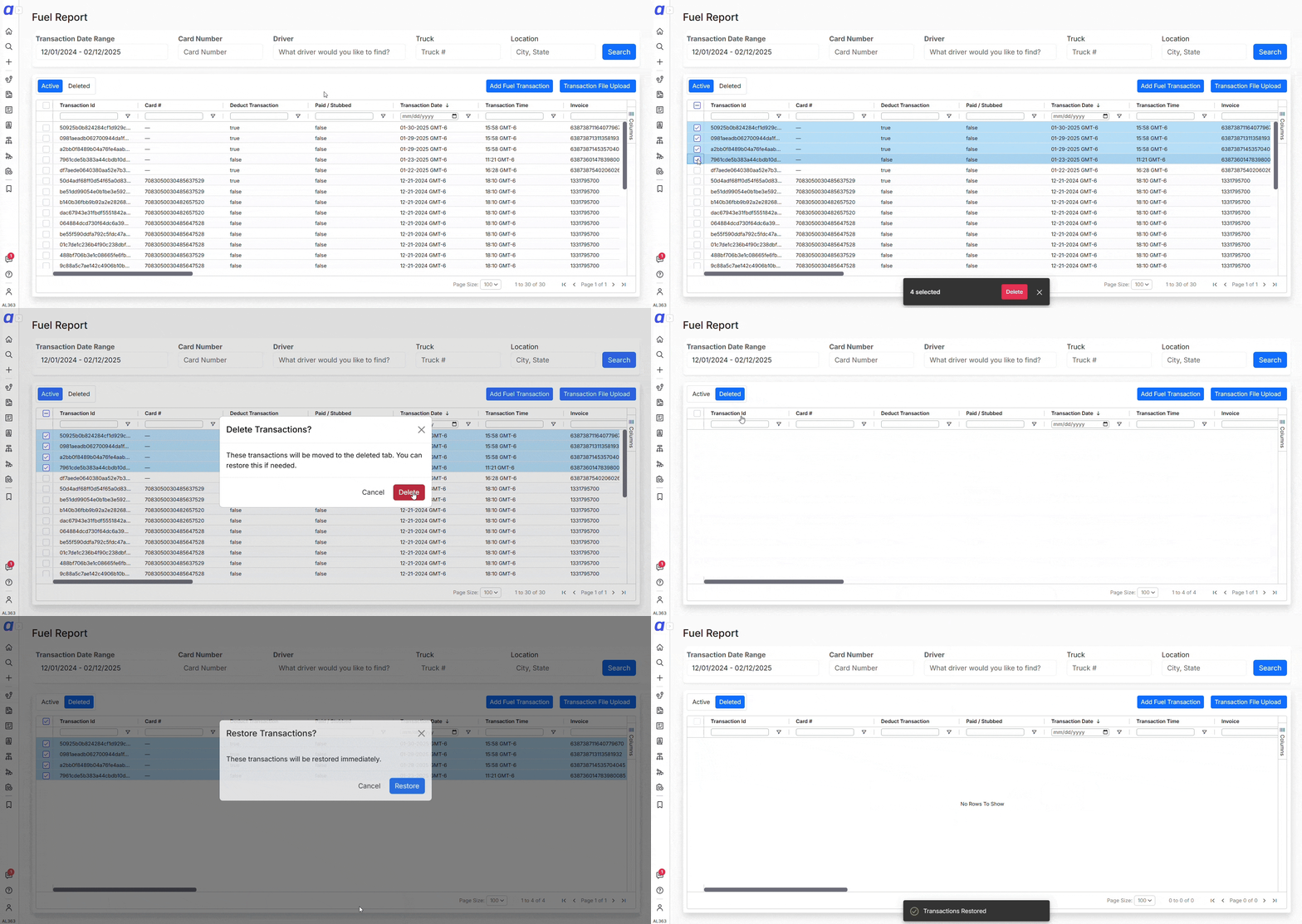
 To delete multiple transactions, open the Fuel Report, use the checkboxes in the left column to select the ones you want to remove, and click the Delete button that appears at the bottom of the screen. If you need to restore deleted transactions, go to the Deleted tab, select the transactions you want to recover, and click Restore.
You can still right-click a single transaction to delete or restore it if needed, but bulk select makes it much faster to handle large lists.
To delete multiple transactions, open the Fuel Report, use the checkboxes in the left column to select the ones you want to remove, and click the Delete button that appears at the bottom of the screen. If you need to restore deleted transactions, go to the Deleted tab, select the transactions you want to recover, and click Restore.
You can still right-click a single transaction to delete or restore it if needed, but bulk select makes it much faster to handle large lists.Deductions, advances & escrow
Bulk Deleting and Restoring Transactions in the Fuel Report
Select multiple fuel transactions at once in the Fuel Report to delete or restore them in a few clicks instead of processing each row individually.
Managing fuel transactions just got easier with bulk select. Instead of deleting or restoring transactions one by one, you can now select multiple at once and process them in a few clicks. This is especially helpful if you need to clean up or recover a large number of transactions without having to contact support.
To delete multiple transactions, open the Fuel Report, use the checkboxes in the left column to select the ones you want to remove, and click the Delete button that appears at the bottom of the screen. If you need to restore deleted transactions, go to the Deleted tab, select the transactions you want to recover, and click Restore.
You can still right-click a single transaction to delete or restore it if needed, but bulk select makes it much faster to handle large lists.
To delete multiple transactions, open the Fuel Report, use the checkboxes in the left column to select the ones you want to remove, and click the Delete button that appears at the bottom of the screen. If you need to restore deleted transactions, go to the Deleted tab, select the transactions you want to recover, and click Restore.
You can still right-click a single transaction to delete or restore it if needed, but bulk select makes it much faster to handle large lists.