
Relay Payments is a cardless, digital fuel payment system; once connected, all fuel purchases made through Relay are automatically imported into Alvys every day at 5 AM Eastern Time. Also known as Relay fuel integration, cardless fuel, digital fuel payments, Relay Driver ID sync.
Overview
Relay Payments is a cardless, digital fuel payment system that eliminates physical fuel cards. With this integration, all fuel purchases made through Relay are automatically imported into Alvys every day at 5 AM Eastern Time and displayed on the Fuel Report and Pay Drivers pages without manual entry. This integration requires setup on both the Relay side and in Alvys before transactions begin syncing. Also known as: Relay fuel integration, cardless fuel, digital fuel payments, Relay Driver ID sync.Prerequisites
Before you begin setup in Alvys, complete the following:- You must have an active Relay Payments account.
- Contact your Relay account representative and request the Alvys fuel integration be enabled for your account. Relay will activate a 16-digit Relay Driver ID for each driver in your Relay portal. This ID functions like a fuel card number in Alvys and links each driver’s transactions to their profile.
- Wait for Relay to confirm the integration is active on their side before proceeding.
How to connect
Once Relay has activated the integration for your account:- Click your username in the bottom left corner of Alvys and select Integrations.
- Select the subsidiary you want to connect.
- Expand the Fuel Cards section and locate Relay.
- Click the pencil icon to open the integration settings.
- Enter the Token ID provided by your Relay account representative.
- Click Save. Next, add each driver’s Relay Driver ID to their profile so transactions can be attributed:
- Navigate to Assets and select Drivers.
- Find and double-click the driver to open their profile.
- Click the plus sign next to Fuel Card Numbers.
- Enter the driver’s 16-digit Relay Integration ID (provided by Relay in their portal).
- Select Relay as the fuel card provider.
- Configure the deduction settings for each transaction type as needed.
- Click Save.
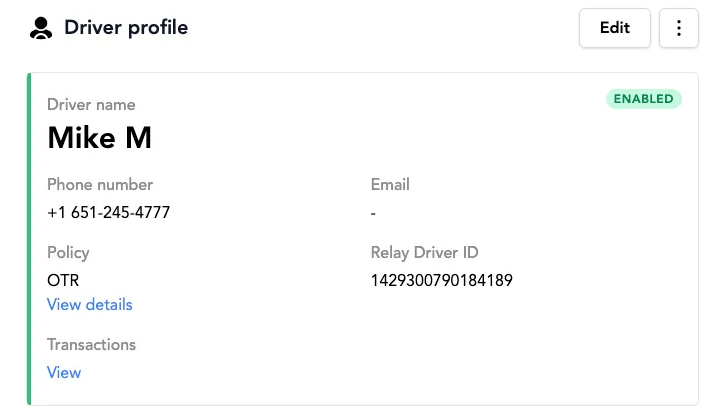 This image shows the Relay portal displaying the 16-digit Relay Driver ID stored on a driver’s profile.
What syncs
Each Relay Driver ID maps to a specific driver in Alvys. For fuel transactions to be attributed to the correct driver, the Relay Driver ID must be added to that driver’s profile in Alvys.- Alvys imports all Relay transactions automatically every day at 5 AM Eastern Time.
- Imported transactions appear in the Fuel Report and the Pay Drivers section.
- There is no manual upload step; once the integration is active and driver IDs are configured, transactions sync automatically.
Troubleshooting
Relay transactions not appearing in the Fuel Report
- Confirm the integration is active. Go to Management > Integrations > Fuel Cards > Relay and verify the Token ID is saved.
- Confirm the driver’s Relay Integration ID is entered correctly in their driver profile. The ID must be the exact 16-digit value from the Relay portal.
- Check that the date range on the Fuel Report includes the date the transaction occurred. Transactions import at 5 AM Eastern Time, so transactions from today will not appear until the following morning.
- If none of the above resolves the issue, contact Alvys support.