
The Load Board includes four region and market filter columns (Origin Region, Origin Market, Destination Region, and Destination Market) that let you filter, sort, and plan loads by DAT-defined geographic boundaries directly within the load board grid, without using external tools.
Overview
The Load Board Region Filters let you narrow, refine, and segment the load board to loads and trips matching specific geographic regions or markets at the origin or destination. Regions and markets are based on DAT shape files, a standard geographic reference used across the trucking industry. The four filter columns are:- Origin Region: the DAT region where the load originates
- Origin Market: the DAT market where the load originates
- Destination Region: the DAT region where the load is delivered
- Destination Market: the DAT market where the load is delivered
Where to Find It
Navigate to Loads and Trips, then open the Load Board. The four columns (Origin Region, Origin Market, Destination Region, and Destination Market) appear in the load board grid. Each column supports two filter modes:- Free-text search: type a region or market name to narrow results
- Set filter picker: select one or more predefined values from a multi-select list
📷 IMAGE: Screenshot showing the four region and market filter columns in the load board grid.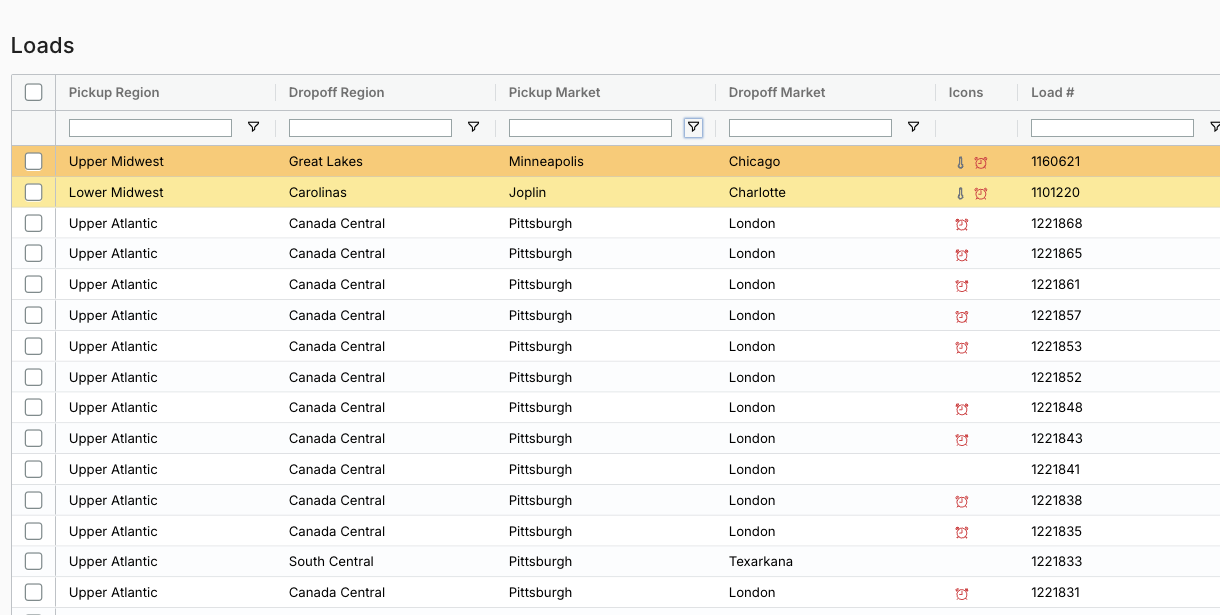
Key Concepts
DAT Regions
DAT regions are predefined geographic groupings of US states and Canadian provinces, defined by zip code ranges and postal prefixes. There are 18 DAT regions: New England, Upper Atlantic, Lower Atlantic, Carolinas, Florida-So Georgia, Southeast, Ohio River, Great Lakes, Upper Midwest, Lower Midwest, South Central, Lower Mountain, Upper Mountain, California, Pacific Northwest, Canada East, Canada Central, and Canada West.DAT Markets
DAT markets are more granular geographic areas within regions, typically centered on a metropolitan area or freight hub. There are 149 DAT markets.Settings & Permissions
All authenticated users have access to the Origin Region, Origin Market, Destination Region, and Destination Market columns in the load board. No additional role or permission is required to view or use these filters.Limits & Behavior
- Region and market values are assigned automatically based on the zip codes of the load’s origin and destination stops. You cannot manually set or override a region or market on a load.
- If a load or trip spans multiple regions or markets, all applicable region or market names appear in the column as a comma-separated list.
- Region and market values are blank when the load’s origin or destination zip code does not fall within any DAT-defined boundary. This can occur for loads with incomplete address data or for locations not covered by the DAT shape file dataset.
- The filter picker for each column displays only the predefined DAT values. Free-text search within the filter also matches against those same predefined values.