
When assigning a carrier to a trip, Alvys may block the assignment and display an authorization error if the carrier’s compliance status with Highway, RMIS, or MyCarrierPackets (MCP) does not meet your company’s requirements. This article explains the cause and how to resolve it.
Symptom
When assigning a carrier to a trip, Alvys displays the message: “We’re sorry, but it appears that the carrier you’ve selected requires a supervisor/manager’s approval to proceed with the assignment.” The assignment cannot be completed without an override.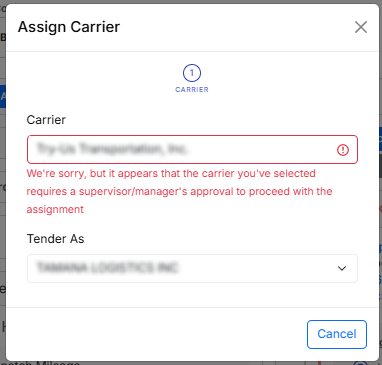 Error message dialog when assigning a non-compliant carrier
Cause
Your company requires carriers to pass a compliance check with one or more verification providers before they can be assigned to a load. The carrier you selected has a status that does not meet that requirement with at least one of the following providers: Highway: The carrier’s status is Fail (non-compliant) or Incomplete (requires review). RMIS: The carrier’s status is Not Certified (non-compliant). MyCarrierPackets (MCP): The carrier’s status is UnacceptableFail or UnacceptableReview (non-compliant), or Moderate (requires review). Statuses that do not trigger this restriction: Pass, Acceptable, Certified, and Partial Pass.Resolution
A user with the “OverrideCarrierRestriction” permission (shown as “Override Carrier Restriction” in Administration, Permissions) can approve the assignment directly in the assign-carrier dialog.- Identify a user in your organization who has the “OverrideCarrierRestriction” permission.
- Ask that user to review the carrier’s compliance status and confirm whether proceeding is appropriate.
-
Have the authorized user complete the override step in the assign-carrier dialog to allow the assignment.
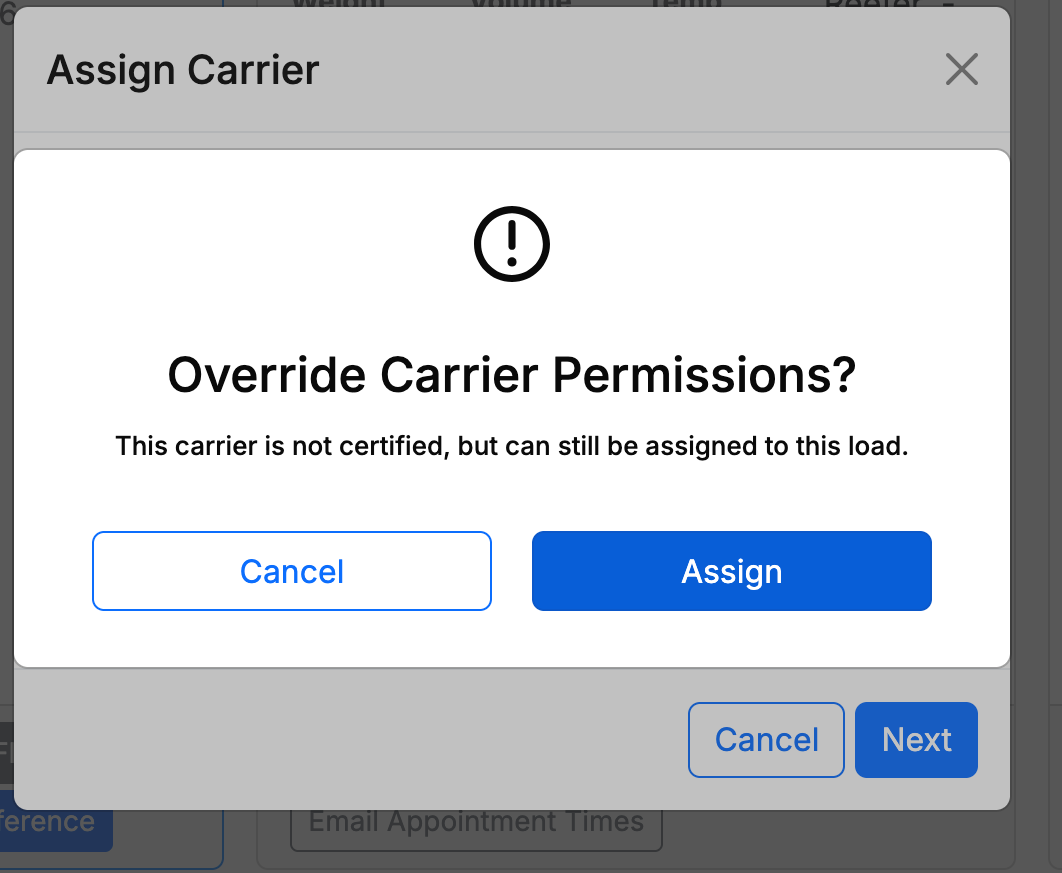 Assign-carrier dialog showing the override option