
Rate Analytics is a beta tool that shows your historical Customer and Carrier rates for a lane alongside market rate benchmarks, helping you price loads competitively.
Overview
Rate Analytics (also called the rates widget) lets you look up rate history for any lane by entering an origin and destination. The tool shows two data sets side by side: your own historical rates from loads you have run on that lane, and an aggregate market rate drawn from the broader Alvys network. This comparison helps you evaluate whether a rate you are quoting is competitive given current market conditions. Rate Analytics is a beta feature. Rate coverage varies by lane and values may update as new data arrives.Where to Find It
Rate Analytics is available in two places in Alvys. Dedicated Rate Analytics page: Navigate to Loads and Trips > Rate Analytics in the left navigation. This opens the full search interface where you can enter an origin, destination, search radius, and equipment type to retrieve rate history for any lane. Load board side panel (Marketplace): When you open a load in the Marketplace and expand its side panel, a Rate Analytics chart appears automatically in the Rates section. This chart shows the last 30 days of Carrier rate history for that load’s lane without requiring a manual search.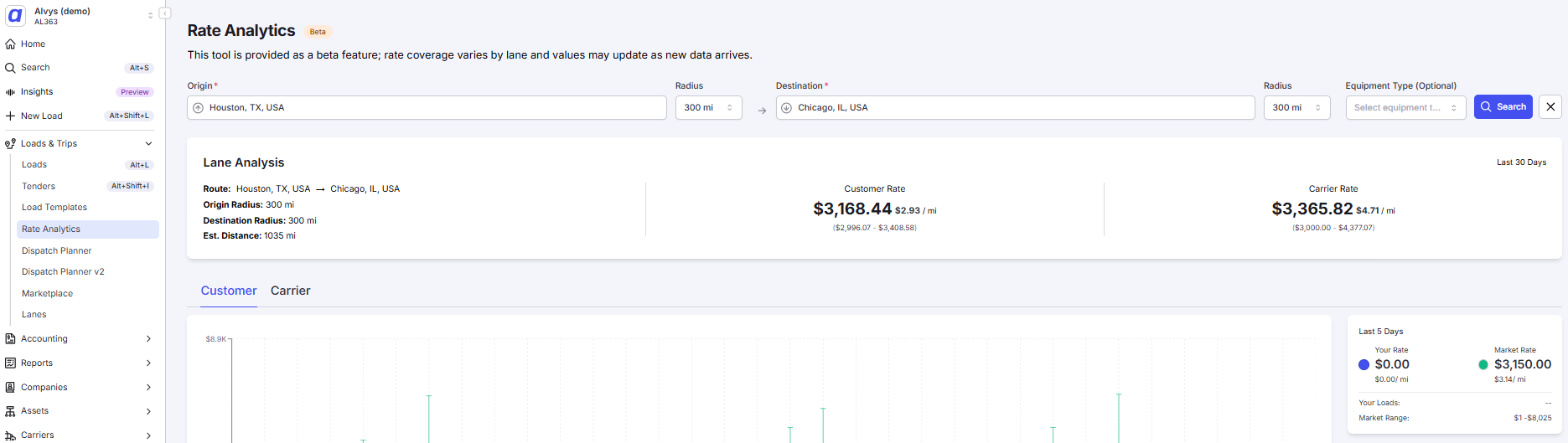 Load board side panel showing the Rate Analytics section with a rate history chart
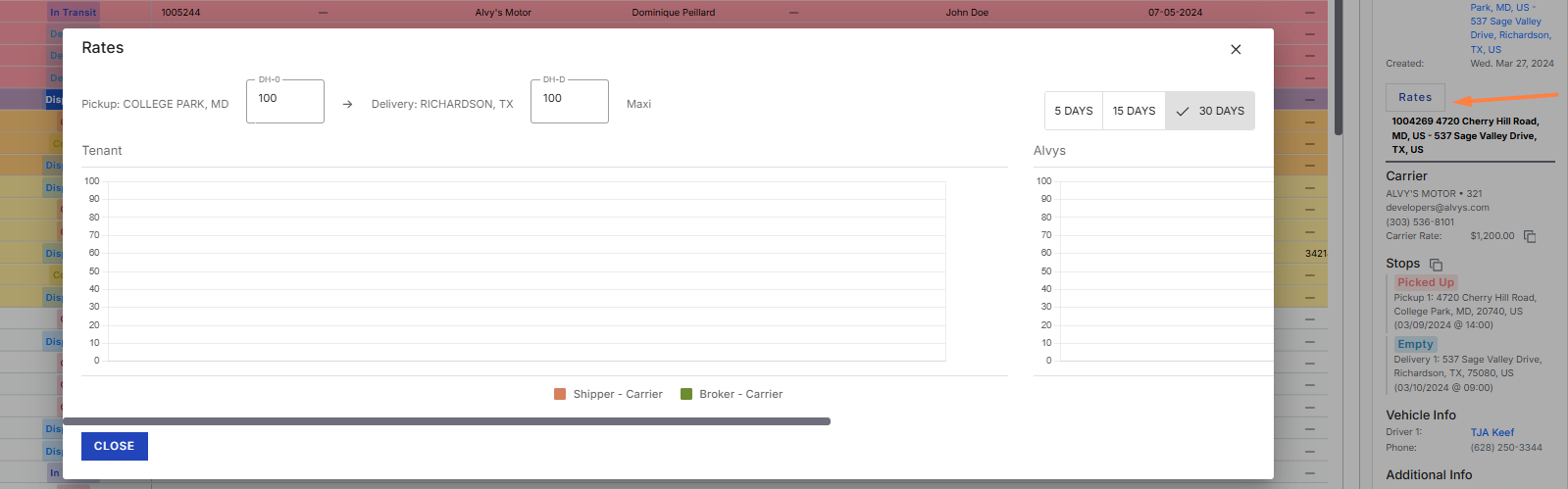 Load detail page showing the Rate Analytics chart in the Rates section.
Key Concepts
Your Rates vs. Market Rates Each chart displays two lines:- Your Rates: the median rate your company has charged for that lane, drawn from your own load history.
- Market Rates: an aggregate median rate from the broader Alvys network for the same lane and time period. This line appears only when you have the “ViewAlvysRateHistory” permission. Customer tab and Carrier tab The Rate Analytics page organizes data into two tabs:
- Customer tab: shows rates on the Customer side of the load.
- Carrier tab: shows rates on the Carrier side of the load.
How to Use It
For step-by-step instructions on searching for rates on the Rate Analytics page, see the Contracted Rates article linked in Go Deeper.Settings and Permissions
Access to Rate Analytics requires at least one of the following permissions: “ViewTenantRateHistory”, “ViewAlvysRateHistory”, “ViewCarrierRate”, “ViewCustomerRate”, or “Bidding”. The “ViewTenantRateHistory” permission is required to retrieve any rate data. Users without this permission receive an access error when the tool loads. The “ViewAlvysRateHistory” permission controls whether the Market Rates line appears on the charts. Users with only “ViewTenantRateHistory” see their own company’s rates but not the market benchmark. If the Rate Analytics menu item does not appear under Loads and Trips, the feature may not be enabled for your account. First confirm you have one of the required permissions listed above; if so, contact Alvys support.Limits and Behavior
- The search window is always the last 30 days. Historical data beyond 30 days is not displayed.
- Rate coverage varies by lane. Low-volume lanes may return no data or data with wider min/max ranges.
- If no data is found, the tool displays a “No Data Available” message. Adjusting the origin, destination radius, or equipment type may return results.
- The Market Rates line is visible only to users with the “ViewAlvysRateHistory” permission. If only your company’s line appears, your account does not have this permission.
- The Customer tab notes that customer rates do not include accessorials.
- Rate Analytics is a beta feature. Values may update as new data arrives.