
Where to Manage Tendering Permissions
Tendering Permissions are configured at the individual user level within the User Management interface. To adjust these settings:- Select your username located in the bottom left corner.
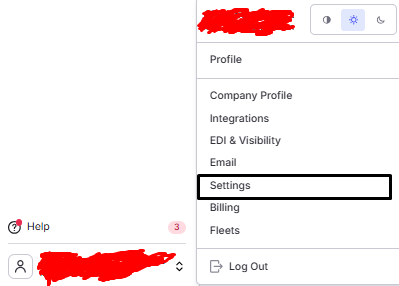
- Navigate to Company Profile and select the Users tab.
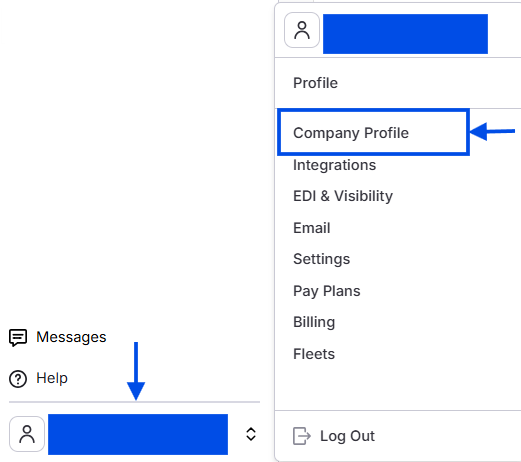 Screenshot showing the Company Profile page with the Users tab selected.
-
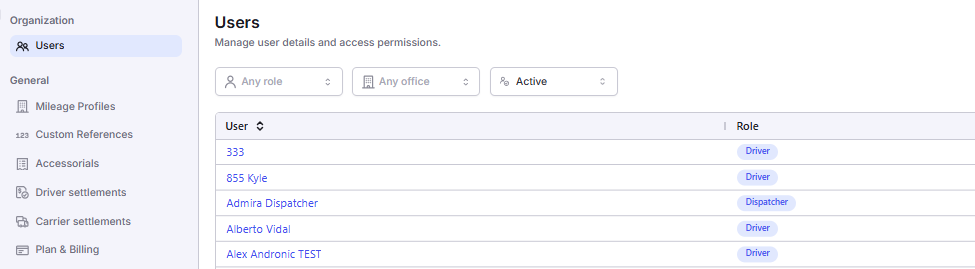
Choose an existing user to Edit or select the Add User button to create a new profile.
 Screenshot showing the user list with Edit and Add User options visible.
Screenshot showing the user list with Edit and Add User options visible.
Screenshot showing the user list with Edit and Add User options visible.
- Scroll to the Permissions section and locate the Tendering category. Identify the two individual checkboxes: “Participate In Tender” and “EDI Share”.
 Screenshot showing the Permissions section with the Tendering category expanded, displaying both checkboxes.
Participate In Tender
The Participate In Tender permission allows a user to access the Tender Board page, where they can view, accept, reject, and manage incoming EDI tenders from shippers and trading partners. Without this permission, the Tender Board is not accessible. Responding to inbound tenders requires specialized knowledge, including lane pricing, equipment availability, and the company’s capacity to fulfill the tendered loads. Limiting access to the Tender Board ensures that only qualified personnel handle load offers, protecting the company’s commitments and revenue. For more information on participating in tendering, see the help center article.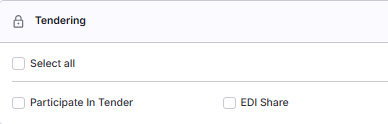
 Screenshot of the Tender Board page showing incoming tenders with accept and reject options.
💡 Best Practice: Grant the “Participate In Tender” permission to users responsible for handling incoming load offers from EDI trading partners, in addition to Data Entry staff. In companies that use EDI tenders extensively, also consider granting this permission to Dispatchers so they can respond to tenders in real time based on available capacity and operational knowledge.
EDI Share
The “EDI Share” permission allows a user to share load visibility data externally with EDI trading partners. This includes status updates, tracking information, appointment times, and other operational details. Without this permission, users cannot perform outbound EDI sharing. Without “EDI Share”, teams must manually receive load information from shippers by email, phone, or customer portal and re-enter it into Alvys. For large shippers sending dozens or hundreds of loads weekly, this manual process is slow, error-prone, and unsustainable. Granting “EDI Share” automates this step and positions your company as a preferred carrier or broker for shippers who require EDI capability. To share an EDI update for a stop:- Open an EDI load in the system.
- On the Load Details page, scroll to the Trips / Stops section.
- Expand a stop and click into an individual stop, either pickup or delivery.
- The Share EDI Update button will appear on the stop card when the stop is in a valid status (Arrived, Picked up, or Empty). The button will only appear if the EDI integration is properly configured to allow updates for that load.
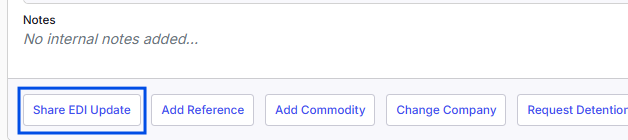 Screenshot of an expanded stop card on an EDI load showing the Share EDI Update button.
✅ Best Practice: Grant EDI Share to users responsible for managing EDI relationships and controlling the sharing of load visibility data with trading partners. If your company automates EDI visibility sharing, this permission is typically only needed for manual overrides or to initiate updates in exceptional cases.
Frequently Asked Questions (FAQs)
Q: Do these permissions work if my company does not use EDI? A: No. Tendering is entirely EDI-based. Without active EDI integrations with your shippers or trading partners, these permissions will have no functional effect in the system. Q: Why does the Data Entry role receive Participate In Tender by default while Dispatchers do not? A: In many workflows, Data Entry staff are responsible for the initial intake and conversion of EDI tenders into active loads. Dispatchers usually manage the loads after they have been accepted, though they can be granted this permission manually if they need to make capacity-based decisions. Q: What specific actions can a user take on the Tender Board? A: Users with the Participate In Tender permission can view tender details, review EDI history, and either accept or reject incoming load offers. Q: Does the Tender Board update automatically when a new offer arrives? A: Yes. The Tender Board uses a real-time connection to the shipper hub. New tenders and updates to existing ones will appear instantly on the board without requiring a page refresh. Q: What is the purpose of the EDI Share permission? A: EDI Share allows a user to send outbound status updates to trading partners, such as arrived/departed notifications, appointment confirmations, and location tracking. This automates the visibility process for large shippers. Q: Can a user access the Tender Board without the Participate In Tender permission? A: No. Access to the Tender Board is strictly guarded. Without this permission, the route is blocked, and the user will be unable to navigate to the page. Q: Why is EDI Share not assigned to Data Entry by default? A: Data Entry typically handles the “intake” of loads. EDI Share is an operational function used to send updates as a load progresses, a task usually handled by Dispatchers or Operations Managers who monitor real-time shipment status. Q: How do I share an EDI update for a specific stop? A: With the EDI Share permission, navigate to the Trips/Stops section of an EDI load, expand the specific stop, and click the Share EDI Update button. This button only appears if the EDI integration is properly configured for that load. Q: Is manual load creation the same as Create Tender? A: No. Manual load creation is an internal process within Alvys. Create Tender sends a formal, electronic EDI 204 message to an external trading partner’s system, creating a legal and operational commitment.Next Steps
⏭️ Proceed to the Additional Load Permissions article to understand how to manage supplementary permissions that support load creation, pricing, and management. This includes permissions for Load Templates and Load Rate History.