
Overview
The carrier rate confirmation is the document that formalizes the agreed-upon rate and trip details with the carrier. You send it from the Tender panel on the Load Details Page. The carrier receives a unique secure link and can sign without an Alvys account. Once the carrier signs, the driver, truck, and trailer details they provide are automatically applied to the trip. They are recorded as the carrier’s External equipment, even when a truck number, trailer number, or driver phone number matches one of your own. Both your organization and the carrier receive an email copy of the signed document. You can also send a preliminary rate confirmation before all load details are finalized. The preliminary version shows only essential information (lane, rate, equipment type, and commodity) and hides sensitive details like full addresses and exact times. Synonyms: rate con, carrier rate con, rate confirmation email, send rate confirmation, tender document.Before You Start
You need the “EditCarrierRate” permission to generate rate confirmations, and the “SendCarrierRateConEmail” permission to email them to the carrier. The load must have a carrier assigned to the trip before you can send the rate confirmation.Steps
-
Open the Tender panel. From the Load Details Page, locate the management ribbon and click the Tender button.

-
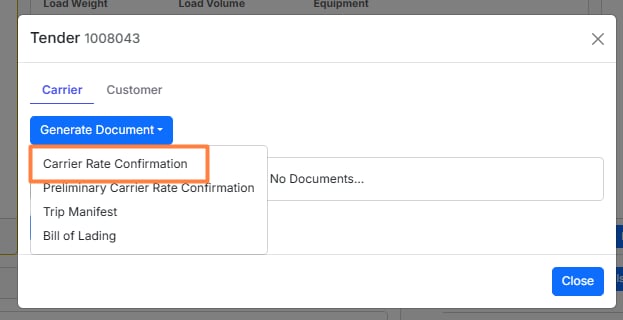
Generate the rate confirmation. In the Tender panel, click the Generate drop-down menu and select Carrier Rate Confirmation.
- Email the rate confirmation to the carrier. After generating the document, click the option to email it to the carrier. The carrier receives a secure link to view and sign. This link expires 48 hours after it is sent.
Result
The carrier receives an email with a unique link to their rate confirmation. They can accept or reject it through that link without needing an Alvys account. If they accept and sign:- The driver, truck, and trailer details they provide are automatically assigned to the trip as the carrier’s external equipment. The trip stays assigned to the carrier you sent the rate confirmation to.
- Both the carrier and your organization receive an email copy of the signed rate confirmation.
Variations
Send a preliminary rate confirmation
Use the preliminary rate confirmation to confirm a carrier’s interest before all load details are finalized. It shares only the lane (city and state), rate, equipment type, and commodity. Full addresses, exact times, and other sensitive details are hidden. Once the carrier signs the preliminary version, Alvys automatically generates and emails the full rate confirmation without any additional steps from you.- Open the Tender panel from the Load Details Page.
-
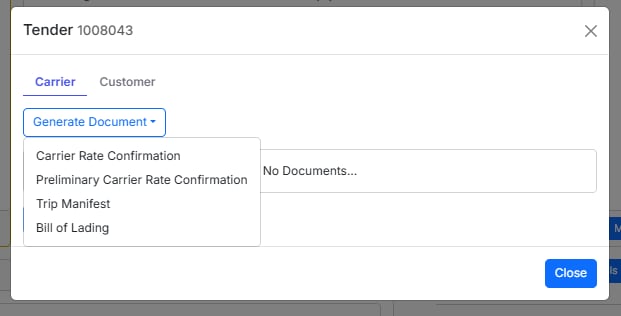
Click the Generate drop-down and select Preliminary Carrier Rate Confirmation.
- Email the preliminary rate confirmation to the carrier. The carrier receives a link to review and sign. The same 48-hour expiry applies.