
Overview
When you send a load to an outside carrier, the carrier hauls it with their own truck, trailer, and driver. Alvys records that equipment as External so it stays separate from your fleet, even when the carrier’s truck number, trailer number, or driver phone number happens to match one of yours. Keeping the two apart matters because your reports follow the truck on each trip. If a carrier’s truck 747 were saved as your truck 747, your truck would pick up the carrier’s miles in the Detailed Financial Report, and location tracking would follow your truck instead of the carrier’s. Synonyms: external truck, external trailer, external driver, carrier truck, carrier asset, non-owned equipment, same truck number.When equipment is recorded as external
Equipment is recorded as external when the carrier on the trip is an outside carrier, and the equipment is entered by number rather than picked from your fleet. This happens in two places:- The carrier signs your rate confirmation. The truck number, trailer number, and driver details the carrier enters while signing are recorded as their external equipment. See How to Send the Rate Confirmation to a Carrier.
- You enter the carrier’s equipment yourself in Manage Assets on a trip assigned to an outside carrier.
Where you see the External label
Carrier trucks and trailers carry an External label wherever your own equipment is listed beside them. Trip information on the Load Details page. The trip’s truck and trailer show External next to the number. The Truck and Trailer on a trip’s details, each marked External.
The Dispatch Planner truck picker. When you search for a truck number that exists in your fleet and as a carrier’s truck, both appear. Your own truck has no label. The carrier’s truck is marked External, and it reads (External) once you select it.
The Truck and Trailer on a trip’s details, each marked External.
The Dispatch Planner truck picker. When you search for a truck number that exists in your fleet and as a carrier’s truck, both appear. Your own truck has no label. The carrier’s truck is marked External, and it reads (External) once you select it.
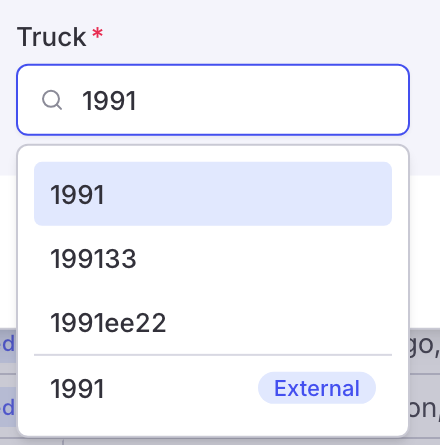 The truck search showing your truck 1991 and the carrier’s truck 1991 marked External.
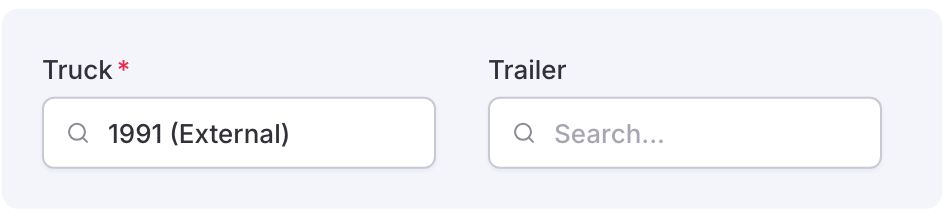 The Truck field showing the selected carrier truck as 1991 (External).
The Assignments page. Under Assets > Assignments, carrier trucks and trailers show an Ext badge in the Truck # and Trailer # columns.
The Truck field showing the selected carrier truck as 1991 (External).
The Assignments page. Under Assets > Assignments, carrier trucks and trailers show an Ext badge in the Truck # and Trailer # columns.
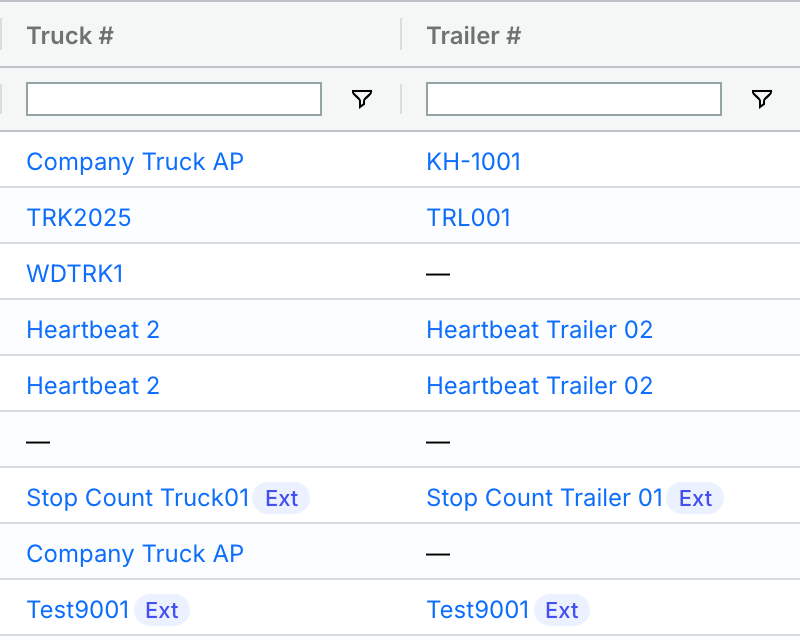 The Truck # and Trailer # columns on the Assignments page, with carrier equipment marked Ext.
Drivers do not carry an External label yet.
The Truck # and Trailer # columns on the Assignments page, with carrier equipment marked Ext.
Drivers do not carry an External label yet.
What does not change
- Your own carrier subsidiaries. A trip assigned to one of your own subsidiaries is hauled with your equipment, so a truck, trailer, or driver entered on it is matched to your fleet as before.
- Equipment you pick. If you choose a specific truck, trailer, or driver from your fleet, or one is already assigned to the trip before the carrier signs, that choice stays. The carrier typing a number does not replace it.
- The signing page. The carrier signs the rate confirmation exactly as before. They are not asked whether the equipment is theirs.