
Adding a USDOT# (also called a DOT number, DOT#, US DOT number, USDOT number, or Department of Transportation number) to a subsidiary lets Alvys identify your operating entity for regulatory purposes and, when creating a new subsidiary, automatically fills in company details from the FMCSA.
Overview
The USDOT# is a unique identifier assigned by the Federal Motor Carrier Safety Administration to entities involved in interstate and intrastate commerce. In Alvys, you can attach a USDOT# to a subsidiary either at the time you create the subsidiary or after the subsidiary already exists. When you enter a USDOT# during subsidiary creation, Alvys looks up that number with the FMCSA and pre-fills the subsidiary’s name, MC#, company type, physical address, contact email, and phone number. You can review and update any of those pre-filled values before saving.Ownership verification
Creating a subsidiary now includes a step that confirms you own the MC# or USDOT# you are registering, before the subsidiary is created. Once you pass it, the verified carrier details pre-fill the form. Three things follow from this:- The verified number is locked. After a subsidiary is verified, its MC# and USDOT# can no longer be edited. The number prints on rate confirmations and invoices, so a correction is a support request rather than a self-serve edit.
- An MC# or USDOT# already registered by any Alvys account is refused, and the reason is shown. This is wider than your own account: another company already operating under that authority blocks it too.
- If verification cannot be completed, the subsidiary is not created. Alvys refuses rather than letting an unverified authority through. Try again shortly.
Ownership verification is rolling out to accounts gradually, so you may not see this step yet.
Prerequisites
You must have the Admin, Partner Admin, or Support role to create a subsidiary or edit the company profile. Other roles can open the company profile and read it, but the owner phone, owner email, and operating countries are shown read-only, and New Subsidiary is not offered. A field with nothing in it reads Not Set rather than inviting you to add a value you would not be allowed to save.If you are a Biller, Accountant, Dispatcher, or Operation Manager and the option to create a subsidiary is missing, that is expected. It is a role restriction, not a fault and not a plan limit.
Steps
- Open Company Profile:
- Select Management in the left navigation.
- Select Company Profile.
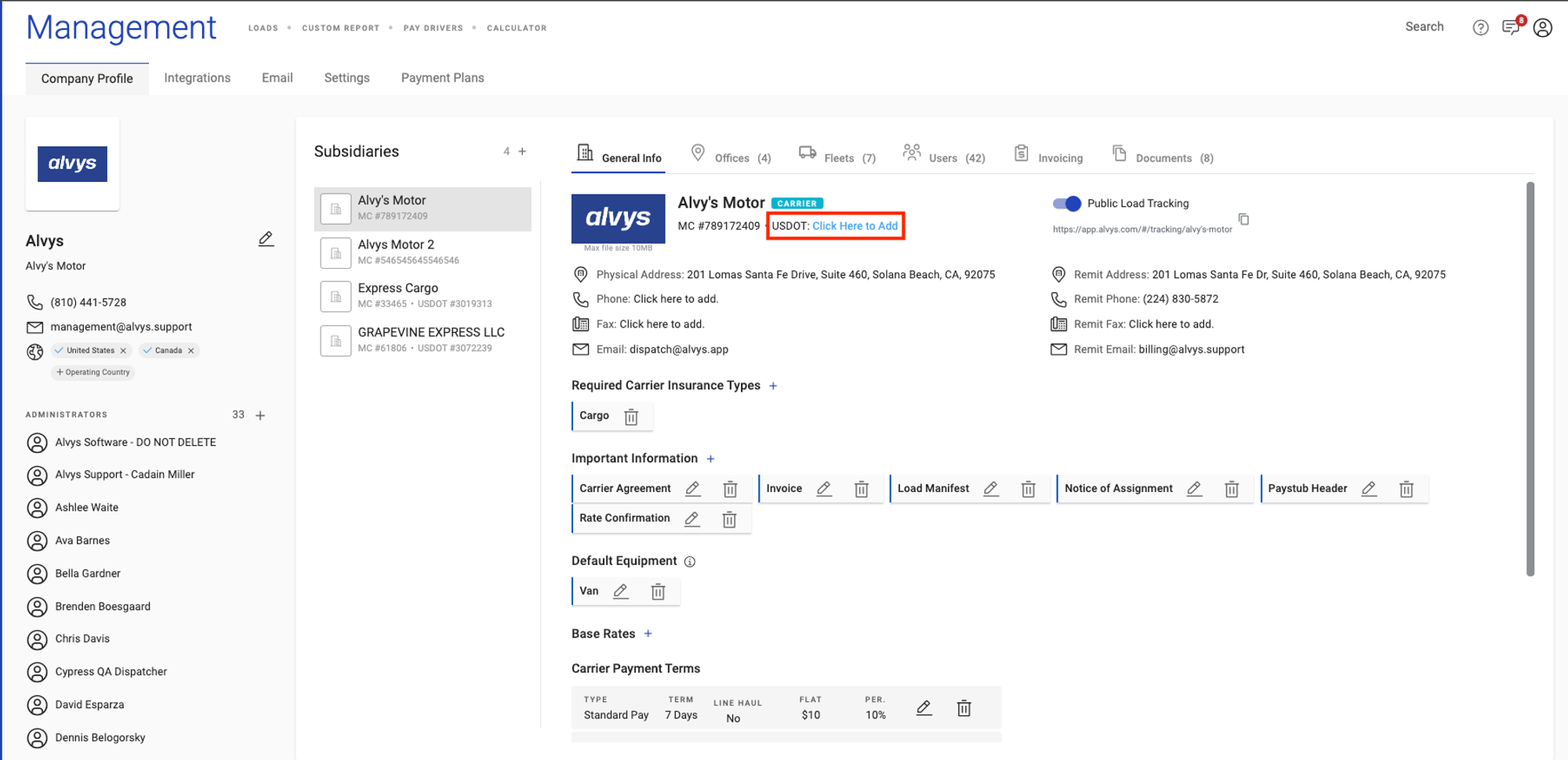
- Locate the subsidiary you want to update in the subsidiary list on the left side, or proceed to create a new subsidiary.
- Add the USDOT# to a new subsidiary (If you are creating a new subsidiary):
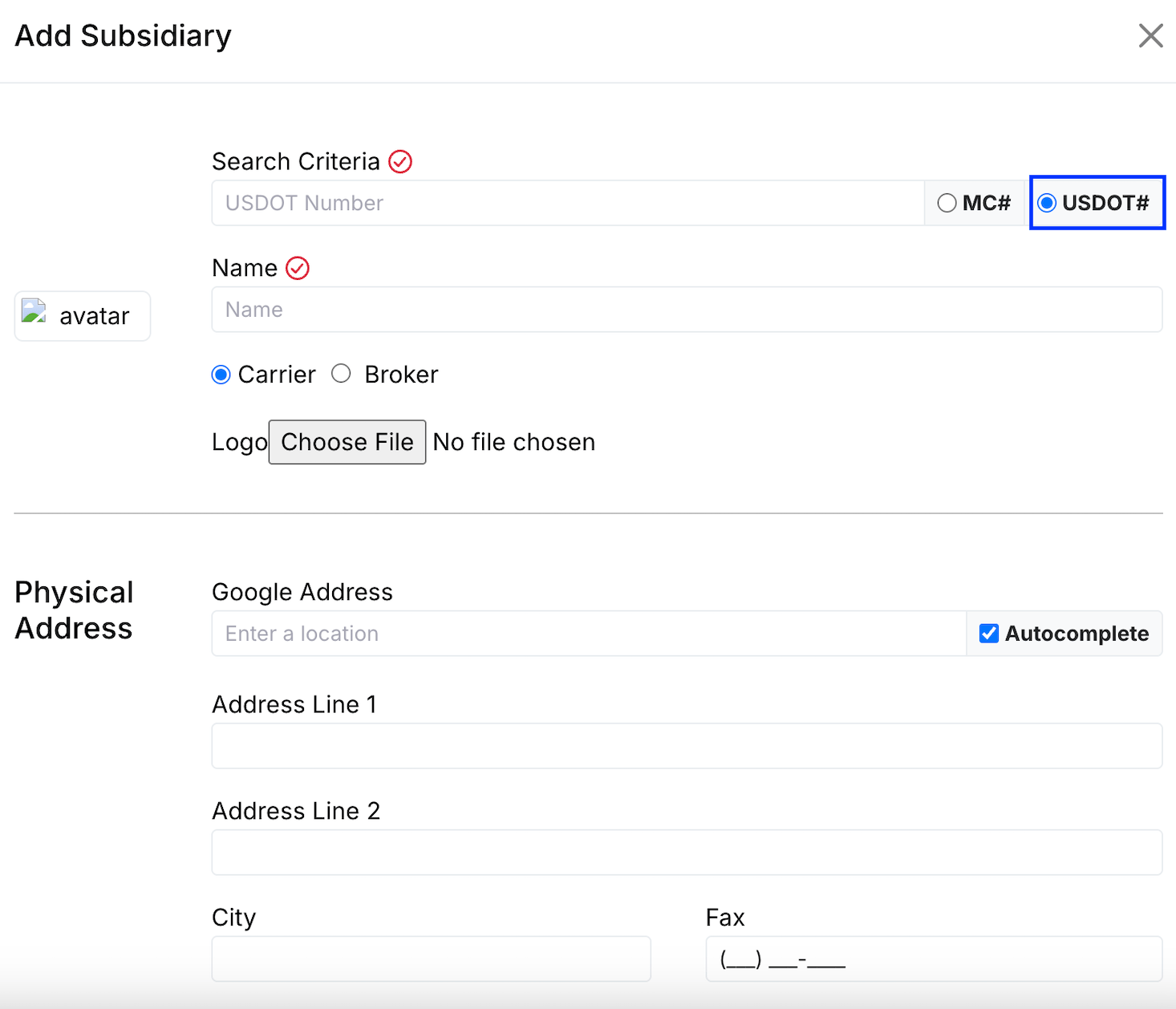
- Select the option to create a new subsidiary.
- Enter the USDOT# in the USDOT# field.
- Alvys contacts the FMCSA and pre-fills the subsidiary name, MC#, company type, physical address, contact email, and phone number based on the USDOT# you entered.
- Review the pre-filled values. You can edit any of them before saving.
- Complete all required fields (physical address and remit address are required) and save the subsidiary.
Variations
Not all subsidiaries have an MC#. For intrastate-only carriers, the USDOT# alone is sufficient. The FMCSA pre-fill works as long as the USDOT# is valid and registered in the FMCSA database.Troubleshooting
USDOT# field does not appear or cannot be edited
- The USDOT# and MC# fields are locked after a subsidiary is created. You cannot edit a USDOT# that was entered at creation time. If the USDOT# on file is incorrect and you need it changed, contact Alvys support; this is not something that can be self-served, because these fields are locked by design to prevent duplicate subsidiaries in the system.
FMCSA pre-fill does not populate any fields
- The pre-fill depends on the FMCSA returning a match for the USDOT# you entered. If no data appears, verify that the number is correct and is registered with the FMCSA. The pre-fill is informational only; you can still enter all required fields manually.
Cannot create a subsidiary with a USDOT# already in use
- The system prevents creating a new subsidiary if the MC# or USDOT# is already registered, and shows you the reason. The check covers every Alvys account, not only your own, so a number held by another company is refused as well. Use a unique USDOT# for each subsidiary, and contact Alvys support if a number you own is reported as already in use.