
Applies to: Admin · Partner Admin · SupportModule: Management > EDI & VisibilityEDI (Electronic Data Interchange) lets Alvys automatically exchange load tenders, tender responses, shipment status updates, and freight invoices between your system and your customers’ systems, eliminating manual document handling.
Overview
Electronic Data Interchange, also known as EDI, is a standardized method for exchanging business documents between computer systems without manual data entry. Alvys uses EDI to receive load tenders from customers, send tender responses, transmit shipment status updates, and submit freight invoices automatically. By automating these exchanges, you reduce manual tasks, minimize data entry errors, speed up communication with major shippers and brokers, and meet the digital communication standards required by large trading partners. EDI integrations in Alvys scale as your business grows, allowing you to connect with additional trading partners without increasing manual workload. EDI integrations in Alvys are configured per customer. Once an EDI connection is active for a customer, incoming tender documents flow directly into the Alvys Tenders board where users with the “ParticipateInTender” permission can review and act on them.Where to Find It?
Navigate to the EDI & Visibility page by clicking your username in the bottom-left corner and selectingEDI & Visibility, or by copying and pasting the following URL into your browser: https://app.alvys.com/#/manage/integrations.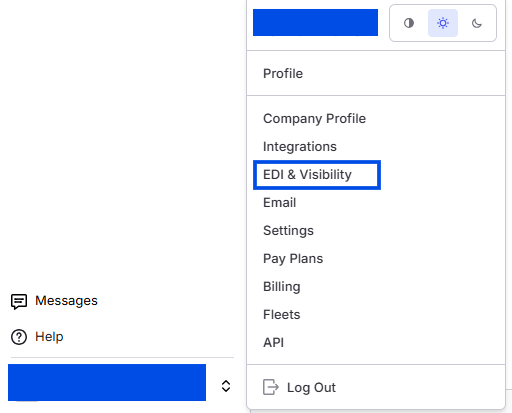
Key Concepts
Transaction Sets
Alvys supports the following EDI transaction sets:- 204: Inbound motor carrier load tender. A customer sends a 204 to offer a load to your company.
- 213: Cancellation of a previously sent 204 tender.
- 990: Tender response. Alvys sends a 990 to accept or decline a 204 tender.
- 214: Shipment status update. Alvys sends a 214 to report pickup, delivery, and in-transit events back to the customer.
- 210: Freight invoice. Alvys sends a 210 to submit an invoice for a completed load.
- 997: Functional acknowledgment. Confirms receipt of a transmitted document.