
Previous Trip and Last Location (also called Previous Stop and Last Location) appears in the Stops section of the Load Details Page. Alvys uses it to determine where the assigned truck is coming from before the current load and to calculate empty miles for driver pay.
Overview
When a truck picks up a new load, it is usually not starting at the pickup address — it is coming from wherever it last delivered or was last located. Alvys tracks that starting point as Previous Location and uses it to calculate empty miles (deadhead) from that location to the first pickup stop. Empty miles feed driver settlements for fleets that pay per empty mile, so an accurate previous location matters for both dispatch planning and pay. Alvys sets Previous Location automatically when a carrier and truck are assigned to a trip. It also re-evaluates Previous Location and empty miles when the driver checks out of the first pickup, so the values reflect what actually happened — not just the schedule that was in place at dispatch time.Where to Find It
Open a load and go to the Load Details Page. Previous Trip and Last Location appears in the Stops section, below the stop list for the current trip. This information previously appeared in the Carrier Details section. If you are looking for it there, check the Stops section instead. The panel shows the prior trip reference, the previous stop address, and the empty miles calculated from that location to the first pickup.📷 Image: Previous Trip and Last Location shown in the Stops section of the Load Details Page, with the carrier’s last known location alongside the current trip stop details.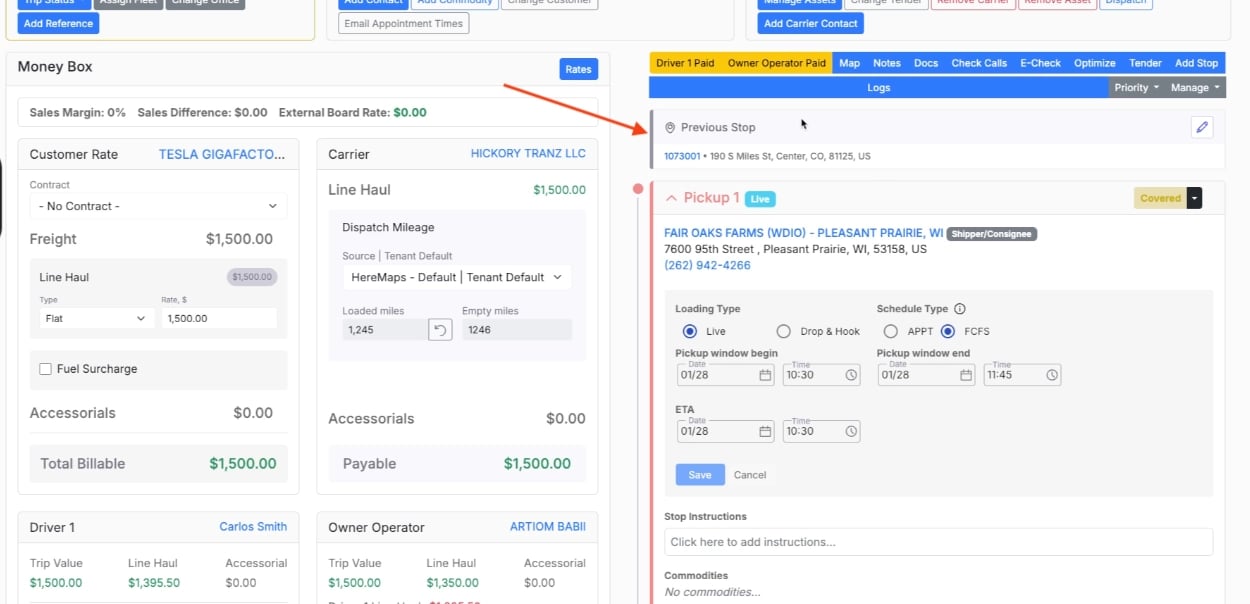
Key Concepts
Previous Location: Where the assigned truck was before this load started. Alvys looks at the truck’s recent trip history to find the most relevant prior stop. Previous Trip: The load or trip Alvys used as the source for Previous Location. It may not always be the immediately preceding load on the schedule — Alvys picks the trip that best matches when and where the truck actually was. See Which trip counts as the previous trip. Empty miles: The distance from Previous Location to the first pickup stop on the current load. Empty miles appear in the same area of the Load Details Page and flow into driver settlement when your pay plan includes an empty-mile rate. Last Location: Tracking data showing the carrier’s or driver’s last known geographic position. This is informational and separate from the previous stop Alvys uses for empty-mile calculation.How Alvys Sets Previous Location Automatically
Alvys resolves Previous Location automatically on carrier subsidiary loads when a carrier and truck are assigned. Brokered loads do not receive automatic Previous Location because Alvys does not track the external carrier’s truck history. Resolution runs at two points:- At dispatch — when you assign a carrier and truck through Manage Assets, Alvys looks up the truck’s recent trips and sets Previous Location and empty miles.
- At first pickup checkout — when the driver checks out of the first pickup stop, Alvys re-evaluates Previous Location using the actual checkout time. Empty miles recalculate at the same time.
Which trip counts as the previous trip
Alvys looks at the other trips assigned to the same truck and uses the most recent one that comes before this trip:- A delivered trip counts when it finished before this trip’s pickup.
- An in-progress trip counts when it picked up before this trip. Once the driver has checked in or out at this trip’s first pickup, it counts only if it actually picked up first.
- A trip that hasn’t started yet (Covered or Dispatched, with no pickup check-in) counts only when it is scheduled to pick up before this trip. This covers a truck that is dispatched on two loads back to back before the first one starts.
- The truck’s next load never becomes its previous trip, even when the driver leaves this pickup after the next load’s pickup window has opened.
How to Set or Correct Previous Location Manually
You can override Alvys when the automatic result does not match what you know about the truck’s movement.- Open the load on the Load Details Page and scroll to the Stops section.
- Click Previous Trip and Last Location to open the Last Locations dialog.
- Select a recent trip from the list, or search for and enter a custom address.
- Alvys updates Previous Location and recalculates empty miles.
- The driver checks in or out at the first pickup, or stop times are edited.
- You re-assign the trip and keep the same truck, for example to change the driver or trailer.
- A different truck is assigned to the trip.
- The carrier is changed or removed.
- The trip is reverted to Open or Quoted.
- The trip is split. The first trip keeps your Previous Location, but it is no longer protected, so it can update when the driver checks out of the first pickup. The second trip gets its own Previous Location.
Limits and Behavior
- Previous Location resolves automatically only on carrier subsidiary loads with a truck assigned. Brokered loads do not show this section.
- The lookup is based on the assigned truck’s trip history. If the driver changed trucks between loads, Alvys may not find the prior trip automatically — set Previous Location manually in that case.
- Manually set Previous Location is protected at pickup checkout and when you re-assign the same truck. See How to Set or Correct Previous Location Manually for what replaces it.
- Stale or invalid previous locations are cleared when Alvys can no longer confirm a valid prior stop.
- Previous Location and empty miles reset when the carrier changes, the trip reverts to Open or Quoted, or a different truck is assigned.